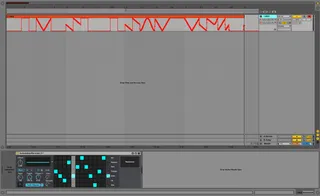
AutomationRecorder
AutomationRecorder - Automate like a boss. Automat...
- Type
- Audio Effect
- Author
- Krypt1k
- Version
- 2.2
- License
- AttributionNonCommercial
- Live version
- 9.1.7
- Max version
- 6.1.9
- Downloads
- 3
- Updated
- 2017-12-30
AutomationRecorder is an Audio Effect for Ableton Live by Krypt1k, distributed as Creative Commons Attribution-NonCommercial. It targets Live 9.1.7 and Max 6.1.9. On maxforlive.com it has 3 downloads. First published 2014-11-16, last updated 2017-12-30. 13 user comments below.
New to Max for Live? Read what Audio Effects do, what the AttributionNonCommercial license means, how to install a device.
Description
AutomationRecorder - Automate like a boss.
AutomationRecorder is a one of a kind innovation that records its built in LFO output into a tangible automation envelope, that can then be copy and pasted onto whatever you want control.
NEW in 2.0:
-Waveform Step Sequencer - Controlled Chaos.
The newly added waveform step sequencer allows you to easily sequence between the active LFO waveforms (very much like NI Massive's Performer LFO). Combine that with the "smooth" control and you can create wicked modulated bass's and much more. I personally have found this sequencer to be incredibly effective when sculpting complex modulation to taste with ease.
Note: Be sure to enable "Automation Arm".
Please email me if you encounter bugs or have suggestions, i read all emails: [email protected]
2/10/15 - Update 2.2:
-New button to prevent the randomize button from selecting the "Random" and "Bin" waveforms during randomization.
-Critical bug fixes for windows users are included in this update. Fixed a bug that prevented functional use of the step sequencer!
1/4/15 - Update 2.1:
-Randomize button integration for step sequencer.
11/16/14 - Update 2.0:
-New waveform step sequencer, incredibly useful for creating modulated bass lines.
-Map the device like the stock LFO to better sequence modulation before drawing it to an envelope.
-Bug fixes.
-Enjoy :)
Comments (13)
That grid selector is a trip! Very profound results....
Ok here's the same concern I've mentioned previously. Even after looking at the preview video you posted, as well as the description, ableton's review, and your own explanation in a reply, I STILL don't understand what you can do with this that you couldn't simply do with a dedicated LFO modulator, besides this very innovative step behavior of course!
I could record the resulting moves of a controlled parameter on an lfo, both to session and to arrangement, yes? I could take that automation data from a clip or arrangement, copy,cut and paste it into an automation lane in another clip, yes? Both yours and others require takeover of the assigned parameter, yes? Why would I ever need to record automation of an unassigned LFO first before applying it somewhere? If it's designed as a utility, why would I need it over an LFO with less CPU impact on my set? If it's designed to be taken out of a session after use, why aren't I using another LFO and freezing that track or just recording the automation with another LFO as I previously suggested? Is there a use of this device that is making a distinction between modulation and automation? How is this thing helping me? If I needed to reach for an automation curve, on demand, why would recording it first save me time or how would it fit into my real time workflow for that matter (considering that Live is built on creating arrangements while playing live)? Wouldn't I just want a device that could render a curve and then just let me copy it directly from a visual window? You know, live a device that renders AMS files. Or a sequencer that has a drag and drop midi clip feature.
What's a case example of why I'd want to use this device? Not just on the conceptual level-actual workflow with example material, and compare it to the particular constraints that I would face if this device did not exist.
The video doesn't really help, and there's no hover-over help. I'd really only understand what the essential function of this tool would be if there was some dialog and explanation in the video, as well as highlighting each step of the NEW process or pointing out the unique result. Ideally, the video would explicitly, not implicitly, address each of the questions. Realize that your audience, such as myself, may have limits in understanding how automation works in live to begin with. What features of automation given it's default functionality do I need to understand in order to understand how this device is different?
Please don't get me wrong, this is an incredible contribution to the community-I just think it may be lost on people. And I'll completely understand if given the fact that you have graciously kept it freeware, that putting in more production time is just too much of an effort. If I understood the device, I'd do it for you!
So if anything, THANK YOU. I do appreciate your work.
The download link is not working anymore. Any chance you could post it again? Thanks!