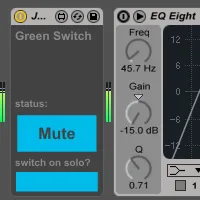
Green Switch Audio
New in this version: Big internal reorganization for greater...
- Type
- Audio Effect
- Author
- JGJP
- Version
- 6.0
- License
- Attribution
- Live version
- 9.1.6
- Max version
- 6.1.9
- Downloads
- 3
- Updated
- 2015-02-28
Green Switch Audio is an Audio Effect for Ableton Live by JGJP, distributed as Creative Commons Attribution. It targets Live 9.1.6 and Max 6.1.9. On maxforlive.com it has 3 downloads. First published 2014-11-22, last updated 2015-02-28. 15 user comments below.
New to Max for Live? Read what Audio Effects do, what the Attribution license means, how to install a device.
Description
New in this version: Big internal reorganization for greater stability and is much better with bigger Live sets that take longer to load
Green Switch is a Max for Live device that automatically turns off all devices within a track when that track is deactivated (i.e. muted), saving you CPU usage and money spent on electricity, along with a little bit of the planet along the way.
To use a Green Switch, simply place it in your track. When the track is deactivated, it will turn off all the track devices. When the track is reactivated, it will restore all devices to their previous states, so any devices that were off before will still be off but any devices that were previously on will be turned back on.
Green Switch v.2 includes an option that accommodates Ableton's solo function, turning off all devices of all tracks except the track that's soloed.
Green Switch v.3 adds a function to turn off all devices within a track without muting the audio.
If your track is already deactivated when you insert a Green Switch, it will automatically turn all your devices off to reflect the track state, but will restore your devices when the track is activated.
There is a MIDI version for MIDI tracks and an audio version for audio tracks.
New in v.6: Improved interaction with Ableton undo queue, you can now undo Green Switch actions, though to do this you need to press ctrl+z or cmd+z a few times in rapid succession, it doesn't work if not done quickly. v6 solo switch functionality is not compatible with previous versions. If there are any bugs please let me know.
Comments (15)
Doesn't Ableton reallocate the memory on deactivated tracks in any case? I think this is true for deactivated chains as well, no? With the addition of this device inline with every track of a session, how would utilizing it save on CPU headroom? And wouldn't it, even marginally, add to MIDI latency (I've noticed that any lengthy chain of devices ultimately will)?
As for electricity-I'm assuming that's in jest, right? Ok just making sure we are on the same page :)
Through my own tests I've found that using this device does free up CPU within your Live set, it's easy to just check the CPU meter in the upper right. I've demonstrated this on the device's page on my site you can see screenshots where CPU usage is reduced 18% just on one track, though I exaggerated it with the amount of devices I loaded on there.
I'm familiar with Ableton's MIDI latency issues and I'll look into this but this wouldn't contribute more than any other M4L device, if this is an issue though you can try giving it its own chain within any rack so it's processed in parallel not series, you can even turn off the chain activator so MIDI/Audio isn't being passed into or out of it as it's not necessary.
As for electricity yes I'm kind of joking here but if your CPU is working less it will save you some amount on your electricity bill, however small ;)
Thank you for the latency-mitigating chain approach. I will give them a go.
I have a set of devices that I made previously that allows you to measure the latency of individual devices and combinations of devices, I will polish up the GUI and upload these for you as soon as possible.
For now I just tested it with the Green Switch in parallel and can confirm that it doesn't add latency this way, when in series it adds 10ms which seems to be standard for any M4L device.
By the way I've done some fixes and a big internal reorganization for the Green Switch so the stability is improved a lot especially for big live sets, I'll be uploading this in the next few days so keep a look out.
I am a professional user of Ableton and the Green Switch utility tool is a brilliant idea. I tested both the audio and midi version. On first sight, everything looked ok... but... I found out that the tools are messing with my undo history. When I insert the tool on a track, I can only go back a few steps in my undo history, and then the undo history keeps undoing steps of Green Switch (although I never changed the parameters of the inserted Green Switch).
Scenario:
1. I insert a Green Switch on a midi track
2. I start editing my arrangement
3. After 10 MINUTES of editing and recording I want to use my undo command
4. I can only go back a few steps in my undo history, after this, Ableton keeps undoing parameters of Green Switch endlessly (although I never changed any parameter of the Green Switch)
I hope my observations are clear to you. I really hope you can fix this bug so everybody could use this 2 tools, the idea is great and extremely useful. Thanks for developing and creating this ! Please keep me posted on the subject matter if possible.
Greetings, Pieter
I have looked into this issue before and was trying out some solutions but other things got in the way, I'll take a look at this when I can and try to work it out. Unfortunately Max for Live is not so good with handling the undo history but I'll do my best to find a solution.
Can you just confirm for me that this happens without you muting/unmuting tracks?
Thanks,
J
Thanks for your response. Just one thing: I don't understand your question :-). Normally, muting a track (with a green switch on) always needs to be just 1 step in the undo history (like all other actions in Ableton you like to undo). So when I mute/unmute a track, and the timing of the mute/unmute action in my working process, don't matter to fix the problem, or am I wrong?
I'm really grateful you take this case serious, I hope you can fix this bug.
Many thanks in advance!
Pieter
I think I understand a bit better but what's confusing is this:
"
1. I insert a Green Switch on a midi track
2. I start editing my arrangement
3. After 10 MINUTES of editing and recording I want to use my undo command
4. I can only go back a few steps in my undo history, after this, Ableton keeps undoing parameters of Green Switch endlessly (although I never changed any parameter of the Green Switch)
"
are you saying that after you put a Green Switch in your set you never touched it (and never muted/unmuted any tracks) and it's still adding steps to your undo history? Or you did touch it but the problem is that it's adding too many steps?
Thanks,
J
I have fixed the issue with the undo queue, please try out the new version and let me know what you think.
It very often doesn't re-enable devices after disabling them, then grabs the wrongly disabled state as the one to go with and I have to re enable every device manually (and remember which ones might have been off as well). Highly unusable :/
The sets in questions probably average 300-400 devices/plugs in total, might that be related? I've had some issues with M4L devices when using the default Live zl wrapper patches (fails to iterate over everything since list gets cut off unless modified), don't have time to look inside your device but might it be due to something like that?
it could well have to do with the amount of devices in your set, but more specifically the amount of devices in a single track that you're disabling/enabling. Also can't really make any guarantees in regards to Live 9.1.9 or 9.2 as I made the Green Switch quite a while ago. I'm thinking of redoing it soon with javascript though so that might solve your issues.
If you want to have a look inside it though it's quite simple.
also I should mention that one of the older versions of the device might work better for you as I changed the whole architecture on this latest one
Could you tell me if it work with group of track?
Can we use automation to control the activation or unactivation of green switch?
thx a lot