Better Computer Keyboard
Who needs accidentals? I made a replacement for Ableton's d...
- Type
- MIDI Effect
- Author
- panison
- Version
- 1.0
- License
- None
- Live version
- 9.1.6
- Max version
- 6.1.9
- Downloads
- 583
- Updated
- 2014-12-26
Better Computer Keyboard is a MIDI Effect for Ableton Live by panison, distributed as freeware, with no license specified by the author. It targets Live 9.1.6 and Max 6.1.9. On maxforlive.com it has 583 downloads. Published 2014-12-26. 1 user comment below.
New to Max for Live? Read what MIDI Effects do, how device licenses work, how to install a device.
Description
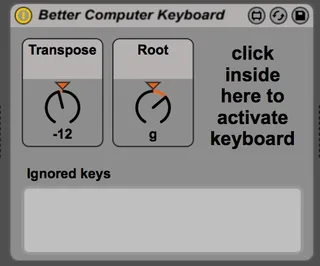
Who needs accidentals? I made a replacement for Ableton's default 1 octave Computer MIDI Keyboard. The layout for this keyboard is (without those pesky sharps/flats):
qwerty row: C5 - C6-->
asdf row: C4 - C5-->
zxcv row: C3 - C4-->
I even included a transpose control in case you felt inclined to play in a key other than C. You can also change where the scale starts on your keyboard (root note on "g" is the way to go).
The details:
Put the device on a track you want to control.
Arm the track.
You have to have to click on the device or it won't see your keystrokes.
Don't change parameters while you've got keys pressed or you might get some sticky notes.
If you want to use "q", KEY map it to a control that does nothing.
If you'd like to understand how the patch works, shoot me an email and I'll clean it up:
Comments (1)