- Type
- Audio Effect
- Author
- rdm
- Version
- 2.0
- License
- None
- Live version
- 8.1
- Downloads
- 4,879
- Updated
- 2010-04-25
r-chain-d-m is an Audio Effect for Ableton Live by rdm, distributed as freeware, with no license specified by the author. It targets Live 8.1. On maxforlive.com it has 4,879 downloads. First published 2010-04-22, last updated 2010-04-25. 11 user comments below.
New to Max for Live? Read what Audio Effects do, how device licenses work, how to install a device.
Description
i would call this one a "sidechain-modulator".
You can use incoming audio to modulate ANY Live Parameter, ANY parameter of your Vst Instruments and ANYTHING capable of receiving midi data (cc,notes)
1) Drop this patch inside of the audio track you want to use as modulation source.
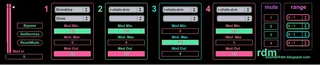
2) In the upper box choose the Device, in the lower box choose its parameter.
3) Set modulation range with ModMin and ModMax. "ModOut" gives you some visual feedback.
4) Make nasty noises.
Notes:
* You can control every parameter with your Keyboard aswell, use MidiLearn to do so.
** Somehow the ModMin/Max Values fuck up on startup, so click "ResetMods" on start.
*** If you drop new Devices after loading this Patch use "GetDevices" to refresh the list.
**** If you find any bugs, contact me or deal with it.
----Update 2.0-----
* i added menus to select the target range for each Modulator. its still 0 - 1 default. if you try to modulate a parameter (e.g. a macro) and the knob is just moving from 0 to 1, then select 0 - 127 in the umenu.
* this is the "more open patch" i also added a few notes here and there to explain whats going on.
* make me feel loved. visit my blog, download some of my tracks. thank you
Comments (11)
Got overdrive on another track that I want to modulate.
Overdrive selected in top box.
Drive in bottom.
No matter what values I use the drive on the distortion never makes it past 1%, it does effect it but only between 0% and 1%
Iam aware about this and iam working on it.
The thing is... the modulators are showing values from 0 - 127 but are actually scaled form 0 -1, because most of the parameters you can configure, especially those of Vst Devices have min and max values of 0 and 1.
Macros and most of the knobs comming with Live have ranges from 0 - 127. So iam about to add a little menu for each mod wich lets you select the target range.
give me a day or two.
Cheers,
Andy
best
A
Unfortunately i don't get any device parameters when i select a Device. Nothing happens, Parameters-Menu stays emtpy. Does anyone have a suggestion?
Here's a bug I ran into and haven't found a workaround for:
Somehow the "mod out" values can affect the arrangement and cause extremely heavy loads on the CPU.
More specifically, when automating the "mod min" & "mod max" controls in Live arrangement view, the "mod out" value-changes cause the the "back to arrangement"-button to light up (even though there are no automation nor mappings on these "mod out" parameters.
Could it be that you have these "mod out" values linked in some way they shouldn't be?
Thanks,
Max.