- Type
- Audio Effect
- Author
- negotiator
- Version
- 1.6
- License
- AttributionShareAlike
- Live version
- 8.1.1
- Max version
- 6.1
- Downloads
- 7,714
- Updated
- 2013-04-12
Omni Looper is an Audio Effect for Ableton Live by negotiator, distributed as Creative Commons Attribution-ShareAlike. It targets Live 8.1.1 and Max 6.1. On maxforlive.com it has 7,714 downloads. First published 2010-04-21, last updated 2013-04-12. 34 user comments below.
New to Max for Live? Read what Audio Effects do, what the AttributionShareAlike license means, how to install a device.
Description
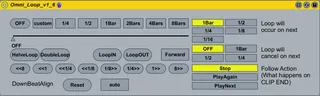
OMNI LOOPER, a looping/beatjump tool for Clips
(post last updated on 07.05.2010, 12:50 GMT)
(SIC!: this device is no longer maintained)
key features
* easy to use, mouse and midimappable interface
* CDJ / TRAKTOR (TM) style looping
* Loop On & Off Quantization
* Auto or manual Downbeat - Align
* backward looping
* Beatjumps
SETUP
In order for omnilooper to have the best effect you have to meet this conditions:
* Clip Launch Quantization must not be smaller than 1/4
* All Clips have to be correctly warped:
- clip start and clip end position is >=1st Position (they must not be set on a negative beat-index)
- clip start and clip end are located on a downbeat
- the downbeat of the clip never changes (= is always on a new bar in lives global transport)
* Tempo must not be greater than 200 BPM
0. Stop all Clips. Stop Lives Global Transport and reset it to 1.1.1 (Click Stop twice)
1. Disable follow actions on all Clips
2. Place the Loop start and the loop end markers somewhere in the middle for EACH CLIP and then switch looping off ON EVERY CLIP
***DOING NOT SO WILL CRASH LIVE***
***the looping functionality will be restricted to this device
3. Enable RAM mode on all clips you intend looping
***This avoids hard drive stalls while using downbeatalign***
4. Choose the desired follow action in the device
for more information view or download the readme
http://www.box.net/shared/15em5yspt9
Comments (34)
Cheers
D
UICTRL sends all the values that the users modifies/enters and displays all relevant information
setLoop contains the complete application logic and also sets/disables loops
i thought that that way it would be easier to integrate it into another patcher
i will add more and more comments in the future, was just lazy in the beginning :)
i will also make the subpatcher for UICTRL downloadable in the future, as soon as i make some cosmetic changes
@s4racen:
but as you stated on your blog , isnt it inefficient to make sends and receives? should i just solve it with inlets & outlets?
great job, but Im still waiting for loop utility wich will be able to loop each audio channel separately. For now, I am able to control for example four channel together with pushing loop lenght (1/2, 1/4 etc) from 1st channel, because your utility, which i put into other next channels, control other channel in same time.
My problem:
I have 2 channels, each has your omni loop (i use midi mapping).
In each channel i have one track.
I start to play 1st channel, second isn't playing.
I can loop 1st how i want.
BUT if I start to play 2nd channel and I start to loop 1st channel (I'm pushing loop lenght button in omni loop wich is in 1st channel), so I'm looping 2nd channel too and thats crazy and useless.
Can you fix in order to omni loop control only own channel?
If I put and I use omni loop from (via midi mapping) 1st channel it will be control only 1st channel.
If I put and I use omni loop (via midi mapping) from 2nd channel it will be control ony 2nd channel.
Sorry for so long comment.
I hope you understand what I'm meaning, my english is easy.
gaw
i think its just a matter of sends and receives, in this case modifiying one device sends values to all omni loop devices, and this shouldnt be a problem to fix
i will look into it when i get home right away
But can we loop less than 1/4 ? With a potentiometer ?
Thank you and good job !
@florian95:
i will add dial loop length control in the future (added to wishlist), thx
if you use s ---name and r ---name then the send and receive only work on the track in which they are contained....
Looping wouldn't go below 1/4 for me without jumping to 0 0 1 size so you go from a beat loop to the smallest glitchy noise that isn't the logical next step.... Would love to know more about potentiometers!!
Cheers
D
thx m8, it works now!
what do you mean by your last sentence? :)
need to do more testing, but it seems that in some special cases you can completely avoid errors from object.live; there are many variables you have to consider though
i ll also try now and dive into javascript to trigger the loops, lets hope that solves our problems
However, I have little presure.
Can you synchronize OFF button with your loop quantization buttons?
If I use 1/2 and smaller (especially 1/8, 1/16) loop size it doesnt wait for first beat (I usually use 1bar quantization) and i must use beatjumpes to fix that.
And If I loop more tracks (four) in same time so its chaos.
Thanks
gaw
i already implemented a downbeat align feature, im currently working on loop off quantization and doing some fixes in the UI.
will release it when its finished, maybe with state of the art design if my friend designer is finished by then
btw if you want the downbeatalign feature right now i can upload it when i get home today :)
Thanks :)
Thanks :)
Thanks :)
if you have some time play around with it, it needs some testing
(i didnt quite have the time to do it, will start tomorrow too with testing :) )
if you encounter any bugs please post, and tell me if you like it or if you want another feature
im working on improving the beatalign, will upload the fix with improved beatalign
if you loop in a live situation you have to turn the loop off before switching to another clip, if you forget it and you have set the follow clip menu to stop , the next time you start this clip will playing once and then stop and you cant manipulate the loop anymore. pls update this for greater control.
this is the best and greatest tool i think more people would use it if it was not in such an beta mode keep working on it man.
greetings
Thank you for creating this device and keep up the great work.
Best regards from Florida U.S.
(Grant Carlisle)
I'm looking forward to working with it.
I'm looking forward to working with it.
The downbeat align feature is classy.
My main question is if you could help me control the looping buttons through in M4L with OSC rather that assigning a midi value to them.
It would be a little easier for me to communicate with you via email. Please just send me your address, mine in [email protected] Thanks a lot
Congrats negotiator, it's a great device!
I need a version with a "1/16" and "1/8" loop buttons instead of "custom".
Would you please do it for me? It will be very useful in my DJ set.
Thanks in advance
Dan
Unfortunately, I have stopped maintaining this device some while ago. You are free to modify it to your needs.