Waveform Selection Looper-Mouse
This is a waveform selection looper. This version is control...
- Type
- Instrument
- Author
- Upow1234
- Version
- 1.0
- License
- None
- Live version
- 9.1.6
- Max version
- 6.1.9
- Downloads
- 2,190
- Updated
- 2015-02-03
Waveform Selection Looper-Mouse is an Instrument for Ableton Live by Upow1234, distributed as freeware, with no license specified by the author. It targets Live 9.1.6 and Max 6.1.9. On maxforlive.com it has 2,190 downloads. Published 2015-02-03. 2 user comments below.
New to Max for Live? Read what Instruments do, how device licenses work, how to install a device.
Description
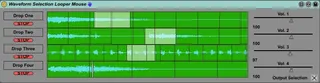
This is a waveform selection looper. This version is controlled exclusively by selecting waveform sections with the mouse.
1. Drop audio file into drop area on the left.
2. Drag mouse to select waveform area and start playback.
~Swipe left to right for selection to play forward, swipe right to left for selection to play backwards.
~Selection automatically loops.
3. Stop with stop button on the left, or with transport stop. Transport play does not start looping.
Upon dropping waveform, volume defaults to 100.
Output selection toggles between:
1. 1 and 3 in the left channel and 2 and 4 in the right channel
2. All waveforms in both channels.
I did this so you could route the lefts and rights to other channels and apply individual effects. (Does anyone know how to route audio to tracks individually? Say route each waveform to a different track?)
I recommend putting the device in an instrument rack and mapping the macros to volume and stop buttons.
This is made to emulate an older software called cooledit, where you could select and loop in a similar fashion. This device gives multi track functionality in a simple max for live device.
There is a version which runs exclusively with knobs that I'll also be uploading. Eventually the knobs and mouse versions will be housed in a hybrid version. Thanks for checking this out, it's my first max for live device and any comments would be appreciated!
Comments (2)
The file does look like it's empty. Sorry about that, not sure how that happened.
Unfortunately, I don't use maxforlive or ableton anymore, so I will try to see later if I can find the file, but I'll have no way to even test if it will open let alone make any improvements.
Thank you