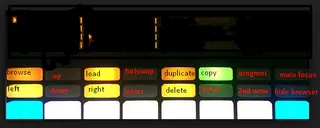
a better search for max devices
mouse trap ..windows only.... screenshot

mouse trap ..windows only....

by 3phase

(windows only) uses KEYSTROKES to LOAD and BROWSE audio clip...

View on maxforlive.com

Type
MIDI Effect
Author
3phase
Version
1.0
License
None
Live version
9.1.6
Max version
6.1.9
Downloads
323
Updated
2015-02-15

Description

(windows only) uses KEYSTROKES to LOAD and BROWSE audio clips... load onto a midi track. select push as control surface (make sure push is surface 1 in prefs). press and hold octave up + press octave down.the tap tempo button light should go out. press tap tempo button to enter key mode. the top 16 buttons will light. key functions in screenshot (operates on screen in focus)

Comments (8)

  • 3phase · February 15 2015
    please give feedback . good/bad
  • specialkay · February 15 2015
    Thanks for device but not working here. Have push selected as 1st control surface. mouse trap device loaded in midi track 1 (have tried others) pressing and holding octave up (scrolls octave up) + octave down (scrolling stops) but tap tempo does not change and pressing it does not launch keystrokes.
    If it was working I wonder how annoying the octave scrolling would be. It seems you can catch it, if you are quick.
    win 7 32bit
    live 9.1.7
    max 7
  • 3phase · February 15 2015
    see if theres any difference if you press and hold octave up press octave down whilst still holding up. release up then release down :). let me know because i downloaded from here and it worked on my system. thanks
  • 3phase · February 15 2015
    once its initilised you can use the octave buttons as normal
  • specialkay · February 15 2015
    Okay I tried it on another install and it almost works. I can access the keystroke mode and pressing the same combination appears to come back out of keystroke but the device is not giving back push control so cannot switch tracks with the track select buttons. But still can switch tracks with cursor for instance. Also the track select buttons still have the keystroke colors also even after deleting device.
    I did work out it's best not to be in note mode when using oct up/down :)
    Win 7 64 bit
    live 9.1.6
    max 7
  • 3phase · February 16 2015
    thanks for getting back to me. could you give it one more try. it is mainly for use in session mode. once its on you shouldnt have to switch it off. you just press tap tempo to regain control of the top 16 buttons. does this not work?
  • 3phase · February 16 2015
    yes i see what you mean. tap tempo must be pressed to leave keymode before switching off.
  • 3phase · February 16 2015
    so its all good now?

← Back to search