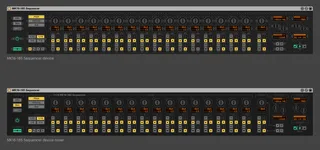
- Type
- MIDI Effect
- Author
- Kapetan
- Version
- 1.5
- License
- AttributionNonCommercial
- Live version
- 9.1.7
- Max version
- 7.0.1
- Downloads
- 22,113
- Updated
- 2015-09-09
MK16-185 Sequencer is a MIDI Effect for Ableton Live by Kapetan, distributed as Creative Commons Attribution-NonCommercial. It targets Live 9.1.7 and Max 7.0.1. On maxforlive.com it has 22,113 downloads. First published 2015-02-17, last updated 2015-09-09. 47 user comments below.
New to Max for Live? Read what MIDI Effects do, what the AttributionNonCommercial license means, how to install a device.
Description
Ciao,
this is a modification of the "ML-185 Stage Controlled Sequencer" originally made by Nico Starke.
(http://www.maxforlive.com/library/device/75/ml-185-stage-controlled-sequencer)
Please comment if you have problems/bugs.
Changelog:
Version 1.5
- New interface and graphics
- Improved randomize section
- Select between two skins
- Minimize button to scale the width of the device to save space
- Set global play mode
Version 1.0.1
- Fixed a bug where the note duration is longer then a tick, especially on 1/32 and 1/16 timing. The note duration now depends on timing.
Version 1.0
- On/Off-Button
- MIDI-Through on main interface
- Save and load presets which will be stored into the Live project
- 1/4 Timing
- 16 Knob Stages
- Randomize and Clear for all settings (excluding division)
- You can adjust the range for randomizing
- Switch between semitones and MIDI-notes
- New Interface
Bugs to be fixed:
- Division number doesn't change when inactive
Download previous version:
http://kapetan.net/mk16/downloads/MK16-185%20Sequencer%201.0.1.amxd
Comments (47)
A Lemur template to go with this would be awesome.
@ModeMasters
Sorry, I have no experience with Lemur.
@staplesyrup
I understand the problem. I will have a look on this when I got the time (No idea how to change this at the moments). Is this a big issue in your workflow?
As I reviewed your problem I realized it is a big issue. So I updated the device to version 1.0.1 and hope the problem is solved. I tested it by recording the MIDI to a second channel and it works fine for me.
the presets also do not save.
would be great to see an update to solve these issues.
Yes, pattern switching would be great.
I'm thinking about to get rid of the presets and change them to savable pattern to switch between them. But I'm afraid of the performance.
Currently working on a new update with an improved UI.
Hope to be finito in a few weeks.
Please comment for bugs and new features!!!
Although I actually often prefer the legato style. Specifically for held notes, which, how it works right now, don't play the full length of the stage because it is cut of to prevent the problem with mono synths (which shouldn't be a problem. Aren't you mostly able to set your monosynth to "retrigger" the envelopes when played legato?).
Best option would be to be able to choose between 4 kinds of behaviours:
1 Play legato (tied notes, so you can do glides)
2 Staccato, current functionality
3 play all notes legato but release them just before the next stage so the envelope on a mono synth is retriggered.
All of the above could be done with a single 'gate' knob.
or 4th:
4 Staccato, current functionality, but held notes are played legato
Keep up the good work! love this device
Thanks for your thoughts.
The trigger/play mode functionality is the next task on my schedule. I recognized I have to refine that part.
For example there is a bug if you are in legato mode on 1/16 and change to 1/32, the notes will not be shortened.
I hope to solve this issue in the next weeks, so that the MK16-185 becomes a reliable tool step by step.
Comments on bugs and new features are still welcome!
I'm looking forward to the updates.
I agree with Mprod. His ideas would be most functional for me.
Some other feature requests:
1. ability to copy first half of the steps to the second half of the steps. So in 16 steps mode, step 9 - 16 becomes identical to step 1 - 8
2. abilty to move all steps one step to the left, this also makes the first step become the last.
cheers!
Thanks for your help. Very good features, saw them on different sequencers.
At the moment, I'm thinking about to rebuild this device from ground, as I realized that the original device's base is very old now.
I would like to make a big step forward for version 2, so we will have to wait for several months for the next version.
I hope to find some time to update the present version 1.5 in between.
Used ML-185 Stage Controlled Sequencer 0.9 previously and this device brings it to a new level!)
Good job! Looking forward for a next update!)
but i got an issue:
live 9.6 max 7.3
the modes won't save when i save project.
GUI appears to be visibly corrupt. Seen on an iMac and Macbook Pro running latest version of Seirra, v.10.12.6.
same problem with the GUI on Win 7
Can you please update it?
What a pity...
While I understand the desire to provide more functionality what was sacrificed was usability not only because of the microscopic size of all of the parameters but it also doesn't feel at all like a real piece of gear so I would say back to the drawing board if you want anybody to be able to use this.