a better search for max devices
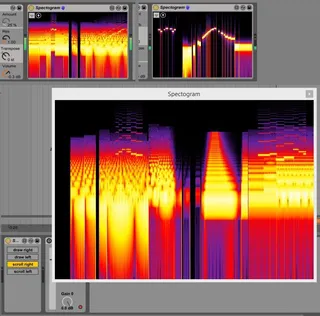
Spectrogram screenshot

Spectrogram

by Patrick320

This is a little Spectrogram - now with an external Window.

View on maxforlive.com

Type
Audio Effect
Author
Patrick320
Version
2.0.1
License
None
Live version
9.1.7
Max version
6.1.9
Downloads
4,036
Updated
2015-04-16

Description

This is a little Spectrogram - now with an external Window.

Comments (8)

  • Anivia · April 14 2015
    Wow nice and light on the CPU, works in Max7, thanks a lot for sharing this!
  • Anivia · April 14 2015
    Sorry for 2 posts should always to fast to click submit...
    Would be nice if the scroll would stop with the transport so it doesn't get overwritten, and if you could save as picture. Of course you could probably add 1000 more things but those 2 things would be really nice to have.
    Cheers!
  • Anivia · April 16 2015
    God I totally missed that it stops when choosing the draw option and screening it is absolutely fine in that case, my bad xD
  • Patrick320 · April 16 2015
    No problem, I don't like it that the drawing or scrolling can't be paused though. It would be great if it's only drawn, when you play a midi note, but this element can only be programmed in given ways. Snapshot also isn't a default option, I guess thesse things can only be implemented by writing special code by a real programmer.
    But it's something...
  • Warmonger · September 13 2015
    Finally logarithmic spectrogram! How about adding frequency axis?
  • Patrick320 · April 18 2017
    I recently looked for a frequency-axis option, but there is none. Maybe someone can create a patch for it.
  • Kuzma · December 16 2017
    I have seen that inside new reaper appears spectral editing (smooth, blur, sharpen and other) of selected zones of the spectrogram. Is it theoretically possible to make this opportunities by m4l functionality?
  • audiobits · September 12 2018
    Cool. It would be a nice feature being able to select the frequency range all the way up to 96 KHz, so you can see if there's anything interesting hiding in 192 KHz recording :)

← Back to search