a better search for max devices
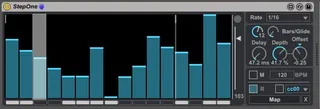
StepOne screenshot

StepOne

by Patrick320

Here is finally a suitable Step Sequencer to map any paramet...

View on maxforlive.com

Type
MIDI Effect
Author
Patrick320
Version
1.2
License
None
Live version
9.1.7
Max version
6.1.9
Downloads
4,964
Updated
2015-03-31

Description

Here is finally a suitable Step Sequencer to map any parameter like it is possible with the LFO-device.

(Version 1.1: Device is frozen now, so the problems from the comment section should not occur; some UI-changes

Versionn 1.2: Delay Fix)

Its code is based on the Arp One by Max for Cats

(http://www.maxforlive.com/library/device/2373/arp-one) and some Functions of the LFO-device.

Specs:

-16 or less Steps

-Adjustable Rate

-Glide mode per Step

-Delay off-beat parameter

-Depth- and Offset-parameter

-Manual bpm-mode

-Key-Retrigger

-Scaleable Random-Button

Have fun.

Comments (12)

  • blortblort · March 19 2015
    Great idea!...but am I doing something wrong? while I can turn off and on steps by left mouse click, I cannot draw in any "graph amounts" (the blue part)... is there some key to hold down while drawing with the mouse or something?
    Please advise?
  • Patrick320 · March 20 2015
    Actually the pattern should be drawn in like you said, just like at every other bargraph in max4live. In my instance it works like that very good. Maybe you are using an older version of max? I have no idea, maybe try downloading and draging it into live again?
    Are here any other users who have that problem?
  • maxforcats · March 20 2015
    You need to freeze the device before uploading in order to make all code dependencies self-contained.
    Cheers,
    C.
  • Patrick320 · March 25 2015
    Oh ok, I´ll try this and reupload it, when I have the time. Thank you.
  • Patrick320 · March 25 2015
    Ok, it is frozen now. *shivering*
  • Crampe · March 28 2015
    Nice device. One little problem though:
    Passed 125 ms, the delay parameter stops working, the sequencer stops running actually.
  • Patrick320 · March 31 2015
    Yes, thats because the delay time can be at highest the time between two steps. At a Rate of 1/16 for example, the time between two steps is only ca. 125ms. If you set the Rate to 1/2, you can turn it up to 1 sec. because the time between two steps gets longer.
    This feature was only meant to get the step rythm off beat, just like the Phase-feature at the LFO-device.
    I´ll try to fix this and find a solution.
    Thank you for the advice :)
  • sevaels · April 22 2015
    This looks great. How hard would it be to incorporate midi export?
  • Patrick320 · April 27 2015
    Well, there's a CC Midi-Out function, but to be honest, I didn't test it, I just overtook it from the piece of patch I already had. Just activate the cc-button. I will check if it works properly.
  • smilinggoat · August 06 2015
    Just wanted to say thanks for this. Great work.
  • alexrm1x · October 31 2021
    Simple and effective man. Thanks!
  • sera · June 21 2023
    Hi, thanks a lot for the device!

← Back to search