Kawai K5000 Controller
This is a simple control panel that maps most of the knobs o...
- Type
- MIDI Effect
- Author
- circumjacence
- Version
- 1.4
- License
- Attribution
- Live version
- 9.2
- Max version
- 6.1.10
- Downloads
- 563
- Updated
- 2015-09-02
Kawai K5000 Controller is a MIDI Effect for Ableton Live by circumjacence, distributed as Creative Commons Attribution. It targets Live 9.2 and Max 6.1.10. On maxforlive.com it has 563 downloads. First published 2015-08-30, last updated 2015-09-02. 5 user comments below.
New to Max for Live? Read what MIDI Effects do, what the Attribution license means, how to install a device.
Description
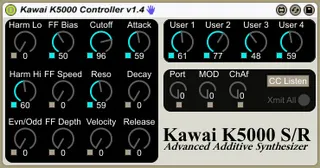
This is a simple control panel that maps most of the knobs on my favorite hardware synth, the K5000S (or R) into a m4l device. All parameters auto-map nicely to the Push (or your controller of choice). On the Push there are three "banks" of parameters, so make sure not to miss the second and third pages!
Please note that each knob has a switch below to activate it. This allows you to only alter selected parameters in a stored patch.
The "CC Listen" toggle button will cause all knobs to listen for CC data sent directly from a K5000 (or other controller).
The "Xmit All" button in the lower right corner re-sends all *ACTIVE* knob positions to the K5000 (useful if you have been using the knobs on the K5000 and want to "reset" it to the m4l device).
[Update 1.4]
- The FF Bias and Harm Hi knobs were swapped - now fixed.
- Added the ability to listen for CC messages (so the controller can now reflect changes made via knobs on the K5000S).
- Added a "CC Listen" toggle (to turn the above feature on or off)
- Added modwheel and channel aftertouch knobs. It might seem redundant to have these as knobs, but I often use them in my patches (and I seem to recall they were used in many presets as well). It might be useful to have them as knobs for automation or control via external surfaces / knobs.
Comments (5)
It doesn't seem to work in Live 10.1.9. This device doesn't seem to output MIDI for some reason.