Momentary Param Booster
This device allows to modulate controls and effects with a p...
- Type
- MIDI Effect
- Author
- atomictag
- Version
- 2.3
- License
- Attribution
- Live version
- 9.2
- Max version
- 7.0.4
- Downloads
- 1,549
- Updated
- 2015-09-09
Momentary Param Booster is a MIDI Effect for Ableton Live by atomictag, distributed as Creative Commons Attribution. It targets Live 9.2 and Max 7.0.4. On maxforlive.com it has 1,549 downloads. First published 2015-09-03, last updated 2015-09-09. 11 user comments below.
New to Max for Live? Read what MIDI Effects do, what the Attribution license means, how to install a device.
Description
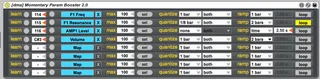
This device allows to modulate controls and effects with a press of a button. As you press the button the mapped control automates until the max (which can be configured) in a set time interval (which can also be configured). If the button is momentary, the control goes back to its original value as you release the button.
Essentially this is a knob-twist automator, which always returns the target parameter to its initial position when no input is received. On going modulations can be stopped and reverted at any time (i.e. no need to wait until completion). Also restarting the modulation can be done at any point.
Starting points of the automation ramps can be quantized and you can set to which ramps (none, up, down or both) quantization should be applied. It's also possible to loop the automation until the trigger controller key is released, in which case the device acts pretty much like an LFO with a triangular signal shape.
One nice feature of this device is that the target parameter is mapped in "transient" mode (much like my other device here http://www.maxforlive.com/library/device/3186/cc-param-control-bank). That means the parameter is locked by M4L when and ONLY when it is transitioning to the target value. Once the animation is completed the parameter is free again to be changed by hand or by other means.
You can assign just about anything to each booster strip: MIDI notes, CC numbers, keyboard keys, and even MIDI-map it the usual way (there's a button on the strip to do precisely that). The only requirement is that the input sends a value (e.g. note velocity, cc value etc.) > 0 to start the animation and a 0 value to stop it. The device contains 8 strips that allow to automate 8 parameter anywhere in the Live set. Chain together more instances if you need more slots. Inputs can be assigned to multiple strips, so you can modulate as many parameters as you wish with just one single button / MIDI note / keyboard key.
- Map a HW button (MIDI note or CC), a keyboard key or anything MIDI-mappable to a booster strip on this device. You can use the "learn" mode for easy setup if you are using a hw controller that sends MIDI notes and/or CC values. Otherwise CMD-M or CMD-K and MIDI-map the trigger button on the strip you want to control.
- Map the strip to any parameter you want to control in Live, in any track you like.
- Setup a max value (or leave it at 100% to go until the end). This marks the end point of the modulation. The start value is obviously the current value of the parameter (therefore it is possible to modulate "up" or "down" depending on whether the max value is set above or below the current value).
- Set the quantization for the start of the automation. The transition starts only when the quantization point is hit. Use "none" for no quantization
- Choose what to quantize. Ramp-up (= key down) or ramp-down (= key up) can be invidually or both quantized
- Fine tune the timing. Set the time it should take for the automation to transition between the current parameter value and its max. Duration can be set in bar fractions or manually by selecting the "time" option. Set the time to 0 to jump from current value to max value and back without progression.
- Loop or not loop. If "loop" is anabled the automation will keep running forward and backward until the trigger is released.
- The automation works also when the live set is not playing (something I find super useful while fiddling with sounds and effects). In this case, of course, quantization is ignored.
========
VERSION 2.3: compute ramp-down time relative to the actual ramp-up value instead of using the absolute time value. This way ramp-downs take exactly the same time as ramp-ups (useful in case ramp-ups have not complete their duty cycle), making the automation curve shape always a symmetrical triangular one.
VERSION 2.2: really bypass quantization if "quantize" is set to "none" (values seems to stay more stable this way). Also ensure formats and values of the input trigger (note or CC) is correctly set on set load.
VERSION 2.1: fix a bunch of bugs and weird issues. Have to say I am not sure M4L is good at preserving my mental sanity.
VERSION 2.0: major upgrade with support for quantized triggers, beat-based durations and looping mode.
VERSION 1.1: cleanup to keep Live undo history tidy
Comments (11)
ANy chance to include Synced values for time as well?
Glad you like it :)
Stay tuned...
Great idea BTW, I was trying to make something similar but not that experiences with Max. +1 on the BPM sync!
I mean can i use this for transitions when performing, when one clip is ending and i'm starting a new clip, running quantized?
I'd like to use your device to automate a bunch of fx, for like 2 bar's length, that can help during transitions.
Thanks!
Thanks for the good feedback, will add quantization at some point (soon). I was thinking about something like:
- You can choose between "free" and "quantized". "Free" will work as it does now, i.e. you set the time, start is immediate, transition interval is proportional to the actual delta between current value and max value. "Quantized" will always start the transition at the next bar (or should that be configurable as well?) and you can choose how long (in beats/bars) the transition between current value and max value will be.
Would that be ok?
For one, I'd get Loop to work on some occasions, and others not. Could be with the type of control-toggle vs momentary- that I was assigning it to. But if loop was toggled with a simultaneous and separate message with the Midi-map'd momentary button, it most typically did not loop, even after waiting the allocated quantization time. Just to make sure I understand this, why does quantization get it's own bang? That's just to visually see when the movement on the parameter kicks in, right?
But in any case, sometimes I did get it to loop. Without looping, it waits until launch quantization, okay. Then it loops at the rate in the ramp value. Then came the next observation: I've found on occasions that I couldn't get the Loop to stop. Even after the Loop button was disengaged, and sometimes even after the Map was unassigned. Weird.
It might be fun if the quantize options also effected the loop, and went directly to the initial value, i.e. without the ramp. That way, if I understand this correctly, you'd already have a sawtooth shape built into the functionality of the loop. In fact, I was exploring the potential of this device as low-overhead and transient takeover LFO for 8 mappable items.
Still, could you volunteer some definitive examples where a momentary control would be better than a dedicated button, and that a ramp is preferred over i/o? Ie, when would you want a button to act as a continuous controller? And I'd love to see how your two devices are designed to work in conjunction. I just couldn't conceptualize it.
Finally, this is another limitation of my own use of Live and devices. What are the implications of the MIDI/CC learn button? Is this like directly assigning values on a VST rather than within ableton's manual midi control? It's just an approach I'm fairly green at so I wonder if anyone could inundate me with it and its merits. How then do the Learn and Map-Me assignments play with each other? Does one takeover for the other, permitting manual control while the other offers timed control? Is the idea that the Learn assignment be an encoder while the map-me remain a button?
So you can see, this was just a shave beyond my ability to incorporate as an intuitive device.
Would that be ok?"
Yes! That would be massively helpful for live performance. Then you can pre-program transitions and be 100% spot on with quantization.