- Type
- MIDI Effect
- Author
- str8updrew
- Version
- 1.0
- License
- None
- Live version
- 8.1.3
- Downloads
- 1,115
- Updated
- 2010-07-30
Master Tempo LFDM is a MIDI Effect for Ableton Live by str8updrew, distributed as freeware, with no license specified by the author. It targets Live 8.1.3. On maxforlive.com it has 1,115 downloads. First published 2010-06-16, last updated 2010-07-30. 5 user comments below.
New to Max for Live? Read what MIDI Effects do, how device licenses work, how to install a device.
Description
Master Tempo LFDM v.1.1
Check the tutorial video here....
http://www.youtube.com/watch?v=YzGEilPExkk
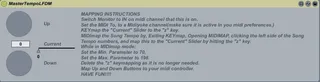
This is a simple midi device for controlling the song tempo in 1 bpm increments. With a simple up and down, controlled via midi controller. Well technically 1.1 bpm's. But oh well.
Just drop the device on an open midi channel
Comments (5)
a) what midi output device are you talking about (midiyoke)?
b) you can't map keyboard keys in midi map mode...
would love to get this working :)
http://www.midiox.com/index.htm?http://www.midiox.com/myoke.htm
If you're using mac you can just create a midi bus with the IAC control panel.
You map the Keyboard keys to the device in keymap mode, then when you hit the keyboard in midi map mode it is sending out a midi message from my device. You see the keymap is only necessary when setting up the device, and i'm using it as kind of a trick to midi map the slider that is controlled by the 2 buttons on the device.
http://www.youtube.com/watch?v=YzGEilPExkk