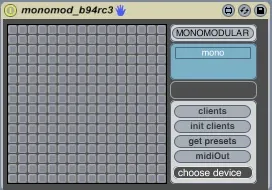
Monomodular.941
(this is the readme for the package...if you are downloading...
- Type
- MIDI Effect
- Author
- amounra
- License
- AttributionNonCommercialShareAlike
- Live version
- 8.1.5
- Downloads
- 3,361
- Updated
- 2010-09-09
Monomodular.941 is a MIDI Effect for Ableton Live by amounra, distributed as Creative Commons Attribution-NonCommercial-ShareAlike. It targets Live 8.1.5. On maxforlive.com it has 3,361 downloads. First published 2010-06-03, last updated 2010-09-09. 9 user comments below.
New to Max for Live? Read what MIDI Effects do, what the AttributionNonCommercialShareAlike license means, how to install a device.
Description
(this is the readme for the package...if you are downloading it here, you will have to download all the client patches individually)
Monomodular beta .94
TouchOSC template:
http://dl.dropbox.com/u/6044993/monomod_b94.touchosc
Instructions for using monomodular:
http://aumhaa.blogspot.com/p/how-to-use-monomodular.html
This distribution contains the most recent version of Monomodular, a modular set of plugins built for Max for Live.
There are several folders contained in this package:
The main files are in the Monomodular folder. Put these in your Ableton Library under /Presets/MIDI Effects/Max MIDI Effect/, or just drag them to that location when your in Live.
Build Your Own has the updated abstract and javascript to build your own client patch.
Control Surface Scripts contains two scripts that go in the Live Application Bundle. APC40 22 is an alternate script written by Hanz Petrov (and modified further by me) that adds a lot of additional functionality to the APC40. Project X is a simple script that adds a navigation box to the Live screen if you are using the iPad TouchOSC script.
OSCBonjour and midiOut are explained below.
The TouchOSC template needs to be installed from the TouchOSC editor if you want to use the iPad as a controller.
Major changes from version .93:
There is now one unified plugin containing controller scripts for all supported controllers, including the Launchpad, APC40, and iPad w/TouchOSC.
There is now a client/host detection system, which will automatically detect the presence between monomod clients/hosts, in addition to autoconfiguring connections for the first 8 clients. Configurations are persistent between Live sessions.
The plugin will run with multiple instances. I haven't had a chance to test it with multiple versions of the same controller. I'd love some feedback about how this is working (or if it is working). I know it runs admirably using multiple versions of the host plugin with different controllers (e.g. one APC, one Launchpad, one iPad).
A new grid navigation system has been implemented. You may now change the offset by increments of one cell with the navigation buttons, or change quadrant by holding down option (APC40:shift, LPD:User2) and selecting the quadrant you wish to go to.
Bonjour is now supported for TouchOSC client connections. You will need to drop the appropriate bonjour external into your Max externals folder. If you are windows, you will also have to install bonjour:
http://support.apple.com/kb/DL999
There is now support for MIDI loopback using nomeout. Creating a virtual node is required for this (e.g. IAC Bus). I've also retained the original nomeout behaviour, but will probably remove it by the next revision unless someone can give me a good reason not to.
In order to make this feature work, just install the appropriate VST in your plugins folder. You will have to set the correct port once per session, as there is currently no way to automatically set or store the right port. Hopefully Ableton/Cycling gives us a better way to do all of this soon.
Hosts and clients are now more stable (less crashing for everyone, hopefully).
Five new clients and one host have been added:
Monolink: connect to any standard monome patch using autoconfig. If the client is autoconfig aware, you shouldn't have to do much. Otherwise, just set the prefix, input and output ports and hope for the best. I've used this on a limited number of clients (maybe 8-10) and it worked fine for all of them, but if you run into one that monolink doesn't work with, please drop me some mail and I'll see what I can do. Monolink doesn't currently support frame messages, but that's just because I couldn't find a patch that utilized them. When I find one, I'll update it to work.
Knobs: control any parameter in your live set with the twist of a knob. It is now a monomod client, so you can save, edit, and recall presets with the grid.
Dummy: this is a dummy patch for sending data to a patch in edit mode through OSC. Greatly improves editing capabilities while creating monomod clients. Just insert the dummy client where you would put the client you are working on, and then open the passthrough in Max alongside the client you are editing. You will have to manually set the channel. You can find out what channel the client is on by looking to see where it registered in the Max Window.
Sment: audio processing with grid support. Ported from Stretta. I'll probably make some changes to this later; it was just a quick port.
Tintinabulo: polyrhythmic goodness. Ported from Stretta. I can't figure out a way to deal with one issue in a timely manner on this one, so for now you can only run one instance without running into problems. I'll sort it out later.
A new Host is also included. It allows the assignment of swing for up to 8 clients to a device controller. It is pretty self explanatory...I removed that section from the host so that you can assign it freely how you like.
The small changes are too numerous to list. Please visit my blog for a full rundown of the changes, as I've been listing stuff as I go for the last several weeks. There were numerous improvements/fixes to each of the original plugins, as well as tons of changes to the way the host itself operates.
Please please please if you run into problems, send me a bug report. Let me know what you are running on (OS, CPU, Max/Live versions), what controller your using, how many, and send me a copy of the Max Window if you can. I'm doing my best to make this as stable as possible for as many different platforms as possible, but I have a limited amount of time to test things outside my own environment.
Praise or criticism is equally welcome.
Have fun :)
amounra
http://aumhaa.blogspot.com
b941 @ 090710: fixed a small bug in the Launchpad script that prevented it from working right with multiple launchpads connected. It seems to work now....someone let me know if they get three working together before I do :)
Comments (9)
thanks a lot for you m4l patch... i looks really promising. Where can i find the 5 patches you're talking about ?
have a great day !
Here is Plinko:
http://www.maxforlive.com/library/device.php?id=311
and here is Nomeout:
http://www.maxforlive.com/library/device.php?id=312
Sorry the documentation probably isn't too great right now...I've been working this patch for over a year and there is a lot crammed in there. I tend to forget and take things for granted. Feel free to drop me a note if you need help getting things working, it will help me figure out what I need to document better.
You said RGB but you want to say tricolor?
I'm searching grid controller for arduinome rgb...
http://vimeo.com/7653504
Thanks in advance!
...
Thanks for your excellent work man!
Works on XP and Ipad as well.
Small bug in Live mode: as soon as I touch fader or dial on Ipad, values immediately jump to zero
Best,
AB
thx for your hard work and all the Time u spent!
I'm on win7 64bit with a launchpad, padkontrol and kore installed.
After a few minutes working with more than two monomod plugs midi data gets incorrect (knobs blinking that shouldn't others don't..) and uncontrollable so that I have to restart live. That doesn't happen that often with the last version. Hope that helps...
nice weekend
michika
If you will drop me some email, I'll try to get the specifics of what is going wrong with your setup and we can fix it.
This site doesn't forward comments to my mail, and I don't have time to check it very often, so be sure to post any bugs on my blogsite. I'm sure to see them there, as I get notified immediately. Thanks :)
will it be difficult to fix?