Midi Notes Redux
Simplify your Midi Keyboard ! Midi Notes Redux allows you to...
- Type
- MIDI Effect
- Author
- floszk
- Version
- 1.0
- License
- Commercial
- Live version
- 9.2
- Max version
- 7.0.5
- Downloads
- 3
- Updated
- 2019-07-29
Midi Notes Redux is a MIDI Effect for Ableton Live by floszk, distributed as a commercial (paid) device. It targets Live 9.2 and Max 7.0.5. On maxforlive.com it has 3 downloads. First published 2015-10-02, last updated 2019-07-29.
New to Max for Live? Read what MIDI Effects do, what the Commercial license means, how to install a device.
Description
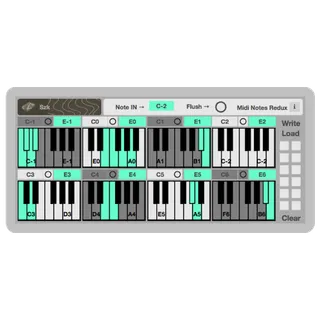
Simplify your Midi Keyboard ! Midi Notes Redux allows you to select different midi notes and reduce them to one single one. Perfect to simplify your mapping for easy creation and live performance. Up to 8 groups of notes can be reduced to single ones.
For each mini-keyboard :
# Top left : Select an offset for the little keyboard (it defines the first note on the keyboard).
# Select two notes on the keyboard that will be the minimum Midi Value / lowest note and max / highest of the interval that will be reduced. Selecting more than two notes won’t change the group that will be defined by the interval between min and max. Even they are not selected, ALL notes between the min/max boundaries will belong to the group.
# Top right : Select the single note that will be played when incoming note in falls into the group.
# Click on individual buttons to reset the group.
IMPORTANT :
# Take care of common notes between different groups.
# Use the Flush button to refresh note on / off if Notes don’t stop properly.
# Presets won’t be saved into your Live set, use write/load to manage .maxpresets files.
______________________________________________________
All our other devices on Gumroad and Sellfy :
https://gumroad.com/szkdevices
https://sellfy.com/szkdevices
______________________________________________________
For more information please visit :
http://m4l.szk.fr/
______________________________________________________