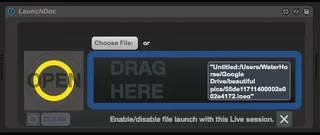
LaunchDoc - an external document launcher
Ableton is likely capable of doing almost everything we need...
- Type
- MIDI Effect
- Author
- WaterHorse
- Version
- 2.0
- License
- AttributionShareAlike
- Live version
- 9.2
- Max version
- 7.0.4
- Downloads
- 723
- Updated
- 2016-11-19
LaunchDoc - an external document launcher is a MIDI Effect for Ableton Live by WaterHorse, distributed as Creative Commons Attribution-ShareAlike. It targets Live 9.2 and Max 7.0.4. On maxforlive.com it has 723 downloads. First published 2015-10-29, last updated 2016-11-19.
New to Max for Live? Read what MIDI Effects do, what the AttributionShareAlike license means, how to install a device.
Description
Ableton is likely capable of doing almost everything we need for our live concerts and media projects, but at times we resort to a 3rd party program for the sake of saving time and comfort. If you have ever wanted to streamline your setup by just opening one file that loads up other files, much like the way we treat vst’s here is a device that allows you to do so.
Just add in your third party file that contains external mappings, associated video, text lyrics, or whatever you want to go with the corresponding session file, then click the button to open (or midi map it). Enable and disable the synchronous launch of that file with the Ableton session file and your off!
I personally see this useful in a dedicated music computer setup. You could theoretically get all of your hardware and software mapped, launch live on startup, set your default session file with the use of 3rd party application files, turn on a computer with absolutely no monitor, and everything just works! (…in theory)
I personally have been using this to handle my software midi routing from MidiPipe: http://www.subtlesoft.square7.net/MidiPipe.html
I have specific routings for different projects and can load them up distinctly with each .als file
Note: One current bug is that the launch on startup toggle doesnt seem to work. I'll work to fix it but for now hopefully you want to use it to launch up documents with the session file.