- Type
- MIDI Effect
- Author
- Simontd
- Version
- 1.02
- License
- None
- Live version
- 9.2.2
- Max version
- 7.0.5
- Downloads
- 1,750
- Updated
- 2015-12-30
CC Out is a MIDI Effect for Ableton Live by Simontd, distributed as freeware, with no license specified by the author. It targets Live 9.2.2 and Max 7.0.5. On maxforlive.com it has 1,750 downloads. First published 2015-12-06, last updated 2015-12-30. 1 user comment below.
New to Max for Live? Read what MIDI Effects do, how device licenses work, how to install a device.
Description
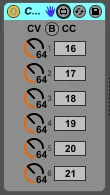
CC Out sends out MIDI CVs on the selected CCs. MIDI passes through as well.
Useful for controlling external hardware.
Can be mapped to Macros and used in combination with other M4L devices. Can be used with Zero SL, Push etc.
Need more CCs? Add more CC Out!
Got CC Outs set up specifically to control your hardware? Group them in a MIDI effect rack and save the rack as a preset!
To limit the amount of MIDI messages getting sent out, they are only sent when the MIDI CV actually changes. To send all current values, press the B button.
MIDI CV is sent out on loading the device. If you need it to not do that, deactivate it and save it as a preset. The device will then send the CV on activation.
PLEASE NOTE:
Sending CC/CV on channels 2-16 from a M4L device or VST is not possible within the natural Ableton Live environment. If you need to send CC/CV on one or more of these channels, you will need to use the I/O options on one or more MIDI tracks or a Max for Live device designed for it, such as Simple Midi Channel Router:
http://www.maxforlive.com/library/device/3349/simple-midi-channel-router
Changelog:
1.01 - Mostly minor cosmetic changes
1.02 - Device no longer sends out MIDI values unless they change. Device still sends out values on load by design. Added B button to send out current values. Added ID number to each CV/CC pair.
Comments (1)
A lifesaver tho!