Multi Parameter Curves
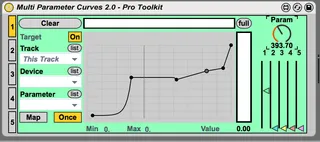
Map multiple parameters to a single knob, with adjustable cu...
- Type
- Audio Effect
- Author
- tomcosm
- Version
- 2.0
- License
- None
- Live version
- 9.6.2
- Max version
- 7.2.4
- Downloads
- 1,280
- Updated
- No Updates
Multi Parameter Curves is an Audio Effect for Ableton Live by tomcosm, distributed as freeware, with no license specified by the author. It targets Live 9.6.2 and Max 7.2.4. On maxforlive.com it has 1,280 downloads. Published 2017-06-14. 5 user comments below.
New to Max for Live? Read what Audio Effects do, how device licenses work, how to install a device.
Description
Map multiple parameters to a single knob, with adjustable curves. Modeled and inspired from Mapulator, so massive shoutout to BentoSan - I'd link to website/social media but all links I've followed are dead. If you're reading this and currently developing a newer working version, get in touch and I'll remove this.
I made this a long time ago but waited to see if Mapulator had any advancements before releasing. Due to requests I am now releasing it publicly.
Comments (5)
Mapulator had a "bug" that it wouldn't recall binds and settings in a group, so it was useless for live setups. I contacted the dev many times, offered money for updates or fixes but sadly he never did.
Can't wait to try it! Does this version work in Live 8?
Thanks again.
Can you perhaps look into it? I hope so :)
I am experiencing the same bug. It doesn't reload the curves. I have it in an audio track without an audio effect rack. You are not experiencing this behaviour Tom? I run it in Live 9.7.6 and M4L 7.3.4
Thanks for a short reply with your versions, and if it works for you.
Thanks a lot!
all the best
Jojo
I have not had any issues with the curves saving within my Audio Effect Rack. The curves that I setuo stay there when I save thee Audio Effect Rack containing the "Multi Parameter Curves 2.0" M4L device
I am using Live 10.1.9. 5 Stars.
Is this a setting I would need to change editing the device? Could you tell me which is this setting?
Hope you can help me and thank you for your work!