- Type
- Audio Effect
- Author
- servicelab
- License
- None
- Live version
- 9.7.3
- Max version
- 7.3.1
- Downloads
- 1,058
- Updated
- No Updates
Morph is an Audio Effect for Ableton Live by servicelab, distributed as freeware, with no license specified by the author. It targets Live 9.7.3 and Max 7.3.1. On maxforlive.com it has 1,058 downloads. Published 2017-07-12. 1 user comment below.
New to Max for Live? Read what Audio Effects do, how device licenses work, how to install a device.
Description
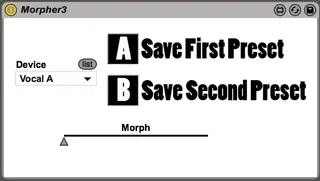
Morph - morphs between two presets of a selected device. Select the device you want to morph. Set the parameters of the selected device to their first location. Click "Save First Preset". Set the parameters of the device to the second location. Click "Save Second Preset". The Morpher now has minimum and maximum values for all parameters changed, and the Fader will now create a transition between those values as you slide the fader.
see demo here:
https://youtu.be/bKUudiV0AaU
Comments (1)
thanks for the great device!