AB Reference Tool
An easy way of setting up reference tracks in Ableton Live. ...
- Type
- Audio Effect
- Author
- ChrisGough
- Version
- 1.0.1
- License
- None
- Live version
- 9.6.2
- Max version
- 7.2.4
- Downloads
- 1,443
- Updated
- 2017-08-05
AB Reference Tool is an Audio Effect for Ableton Live by ChrisGough, distributed as freeware, with no license specified by the author. It targets Live 9.6.2 and Max 7.2.4. On maxforlive.com it has 1,443 downloads. First published 2017-08-02, last updated 2017-08-05. 6 user comments below.
New to Max for Live? Read what Audio Effects do, how device licenses work, how to install a device.
Description
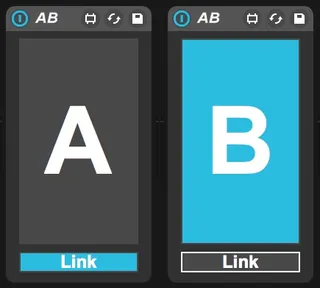
An easy way of setting up reference tracks in Ableton Live. Simply Drop the "AB" device onto the track with the reference material and use the A/B toggle to switch between your work in progress (A) and the reference material (B).
"Link" lets the "A/B" toggle bypass the first device in the master channel, so make it a mastering audio effect chain and it will let you hear the reference tracks clean when the reference material is played. After the mastering chain, you can place your visual analysis tools.
v1.0.1 update: AB Tool now correctly monitors first device in master track. (Fixes deferlow errors displayed in the Max window)
Comments (6)
You achieve the same thing without needing to use an extra device. Bonus points if you save it in your master template once. That way it's always setup and ready to go whenever you start a new project. Just drop in your reference track and you're good to go.
Ah Ext. out! you learn something everyday.. and so many ways of achieving the same goal. If using return tracks with long delay or reverb type of effects I still get the tails playing over the ref track using EXT out. I guess muting the return tracks at the same time as soloing the ref track would work, or is there another way?
Do you follow? Here's a quick screenshot: http://i.imgur.com/1d65fkR.jpg
I send all my tracks to a pre-master track, which essentially IS my master track so that I can group all my tracks and transfer everything ('master' (pre-master) fx and all).