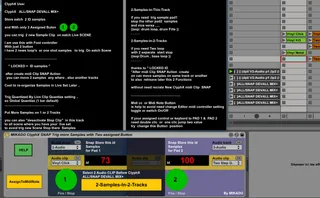
MIKADO ClyphX SNAP Two Button Trig Many Samples
ClyphX User ClyphX ALL/SNAP DEVALL MIX+ St...
- Type
- Audio Effect
- Author
- spiralune
- Version
- 2.0
- License
- None
- Live version
- 9.7
- Max version
- 7.2.4
- Downloads
- 298
- Updated
- 2017-08-21
MIKADO ClyphX SNAP Two Button Trig Many Samples is an Audio Effect for Ableton Live by spiralune, distributed as freeware, with no license specified by the author. It targets Live 9.7 and Max 7.2.4. On maxforlive.com it has 298 downloads. First published 2017-08-19, last updated 2017-08-21. 1 user comment below.
New to Max for Live? Read what Audio Effects do, how device licenses work, how to install a device.
Description
ClyphX User
ClyphX ALL/SNAP DEVALL MIX+
Store eatch 2 ID samples
and With only 2 Assigned Buton
you can trig 2 new Sample Clip on eatch Live SCENE
I am use this with Foot controller
With just 2 button
i have 2 news loop's or one shot samples to trig On eatch Scene
........................................................
" LOCKED = ID samples "
after create midi Clip SNAP Action
you can move 2 samples any where , also another tracks
Cool to re-organize Samples in Live Set Later ..
Trig Quantized By Live Clip Quantize setting ..
so Global Quantize (1 bar default)
.....................................................
Put More Samples on 1 or 2 Tracks
you can also "desactivate Stop Clip" in this track
to all scene where you have your live set
to avoid trig new Scene Stop there Samples
..........................................
< 2-Samples-in-This-Track
if you need trig sample pad1
stop the other pad2 samples
and vice versa .....
((exp: drum loop, drum Fills ))
< 2-Samples-in-2-Tracks
if you need Two loop
with 2 separate start stop
((exp:Drum , bass loop ))
thanks to " LOCKED ID
"After midi Clip SNAP Action create
on can move samples on same track or another
to also retreave later this 2 Functions
without need recrate New ClyphX midi Clip SNAP
.....................................................
Midi cc or Midi Note Button
is help to avoid need change Editor midi controller setting , toggle or switch On/Off
If your assigned control or keybord to PAD 1 & PAD 2
need double clic or one clic jump two value
try change this Button position
....................................................................
Comments (1)
Thanks