doc drunken effect
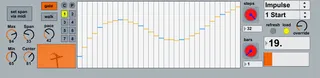
This midi sequencer uses a drunken walk random number genera...
- Type
- MIDI Effect
- Author
- docprosper
- Version
- 1.3
- License
- None
- Live version
- 8.1.4
- Downloads
- 1,935
- Updated
- 2010-11-17
doc drunken effect is a MIDI Effect for Ableton Live by docprosper, distributed as freeware, with no license specified by the author. It targets Live 8.1.4. On maxforlive.com it has 1,935 downloads. First published 2010-10-31, last updated 2010-11-17. 7 user comments below.
New to Max for Live? Read what MIDI Effects do, how device licenses work, how to install a device.
Description
This midi sequencer uses a drunken walk random number generator, when enabled, to overwrite output levels. These output levels can be used to drive downstream effects, knobs, etc. Eight presets available, as well as the ability to set min and max note levels via midi key inputs. Enjoy!
hint: link to a rack's chain select with different effects spread about the rack chain for beat glitching goodness ;)
Version 1.3 saves the output path to the Live set. Simply press the load button to load the path upon opening a set. This variable is global so one button press will load the saved paths for ALL instances of the device.
Comments (7)
i put it in front of synth, and nothing happens.
is this not a sequencer at all, just for modifying fx parameters ?
any feedback would be great.
tia
uxeexu
-Hamish
p.s. activate the info view in Live, and when you roll over the various controls of my patch hints should appear.
THX very, very much !!!
http://forum.ableton.com/viewtopic.php?f=35&t=152896
hit the jump for comments, issues, requests, etc.