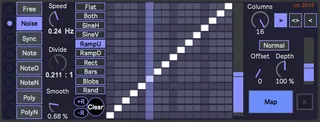
MIDI ProbablyLFO mr
LFOs in Ableton Live normally provide a speed control and a ...
- Type
- MIDI Effect
- Author
- synthesizerwriter
- Version
- 0.06
- License
- None
- Live version
- 10.0.1
- Max version
- 8.0.0
- Downloads
- 2,274
- Updated
- 2018-04-24
MIDI ProbablyLFO mr is a MIDI Effect for Ableton Live by synthesizerwriter, distributed as freeware, with no license specified by the author. It targets Live 10.0.1 and Max 8.0.0. On maxforlive.com it has 2,274 downloads. First published 2017-11-30, last updated 2018-04-24. 4 user comments below.
New to Max for Live? Read what MIDI Effects do, how device licenses work, how to install a device.
Description
LFOs in Ableton Live normally provide a speed control and a waveform selector, plus a way of mapping the output to a parameter. ProbablyLFO has all of these, but the way it approaches each of them is intended to extend and enhance what it does.
So there are many ways to control the speed:
- Free-running (smooth progress across the grid),
- Noise (same average speed as free-running, but jerky),
- Synced to Live's Transport with a fractional divider,
- and some special modes based on MIDI note events.
There are a small number of preset waveforms which can: be edited live; have random values added; can be filtered/smoothed; and output, in various ways. You can smooth the waveforms (or leave them jagged), make them probabilistically variable (so you get variations on waveforms), change the number of steps, run it forwards, backwards or scan backwards and forwards, draw your own waveforms, add or subtract randomness from waveforms, invert, offset and scale the output.
Just another ordinary LFO then... (Nope!)
v05 adds new timing lights and modes. There are two new 'Note' modes, and one new 'Poly' mode. '...N' modes are influenced by the number of simultaneous notes, whilst '...D' modes look for changes in notes, so the same note will not trigger an advance across the grid. Watch the lights to see which mode is the right one for your application.
v06 adds a new timing source - noise! Instead of smooth jumps from one beat to the next, you now get jerks, with an average time the same as the 'Free' free-running clock. The 'Offset' control is also fixed.
The 'Noise' mode is explored (with waveform captures) in my blog: http://synthesizerwriter.blogspot.co.uk/2018/04/irregular-timing-in-maxforlive-lfo.html
Comments (4)