- Type
- MIDI Effect
- Author
- synthesizerwriter
- Version
- 0.06
- License
- None
- Live version
- 10.0.1
- Max version
- 8.0.0
- Downloads
- 2,263
- Updated
- 2018-04-24
ProbablyGEN mr is a MIDI Effect for Ableton Live by synthesizerwriter, distributed as freeware, with no license specified by the author. It targets Live 10.0.1 and Max 8.0.0. On maxforlive.com it has 2,263 downloads. First published 2017-12-03, last updated 2018-04-24. 10 user comments below.
New to Max for Live? Read what MIDI Effects do, how device licenses work, how to install a device.
Description
ProbablyGEN ('generator') is a three-channel 'timing' generator MIDI Effect that's the offspring of step sequencers and a/synchronicity. Each channel has a choice of free-running (async) or synchronous (divided from Live's transport), a probabilistic 'velocity' grid (with a special variation on the previous user interface specially for this type of application), length control per grid, direction controls (forwards, backwards, scanner), and completely straight-forward (gasp!) MIDI Note output selection.
If you've ever wanted to mess around with timings that are galaxies away from the 4:4 world, then this may be your ticket to a different universe...
(This is a MIDI Effect, so you will need to add a Drum Kit or Instrument after it in your track (and then maybe an Audio Effect...)
---
Alternatively, ProbablyGEN is a Kick, Snare, and Hi-Hat drum machine which lets you break rules - just follow this MIDI Effect with a drum kit to hear the MIDI Notes that it produces.
Each drum sequence channel can have a different number of steps. Each drum sequence can be running at a different tempo. Each drum sequence channel can be different on each repeat. Each drum sequence channel can run forwards, backwards, or even scan backwards and forwards in a loop. So the Kick could be a 16 step sequence, the Snare a 17 step sequence, and the Hi-Hat a 21 step sequence - and this is just the start of the possibilities.
ProbablyGEN's defaults are for the MIDI notes for the Kick, Snare and Hi-Hat drums in an Ableton drum kit, but you can also set them to any other MIDI notes, and so it can drive instruments too. So one note could be running at Live's transport speed, one could be a third faster, and one could be a quarter of the speed (or many other ratios).
Version 0.03 explores another aspect of (a)synchronicity - there are now manual 'Random' and 'Generative' buttons for each channel, (using 'X' gates to limit the effect) that let you randomise/modify/generate the chosen channel ('X') either with a free running LFO ('n' seconds between each randomise) or synchronised (number of bars between each randomise) to Live's transport. The newly revised 'Random' generators are per-track, and use generative constraints to impose structure into the randomness. I have also increased the range of the 'bar count' to 1, so you can generate a new pattern every bar if you want. With these additions, ProbablyGEN now provides even more possibilities!
Version 0.04 revises the added functionality from 03, and provides more flexible control. You can now automatically (and synchronously or asynchronously) generate or randomly modify any of the grids. There's a new blog posting that describes the new functionality:
http://synthesizerwriter.blogspot.co.uk/2018/01/asynchronous-timing-generator-for-max.html
Version 0.05 tries to fix the selector bug, and adds per-track constraint-based random generative modifications - effectively making the previous 'Gen' function superfluous (it will probably vanish in the next version). There are more details in my blog:
http://synthesizerwriter.blogspot.co.uk/2018/01/constraint-driven-modification-grids-in.html
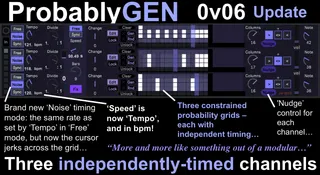
Version 0.06 adds a second 'Async' mode - 'Noise'. This timing mode is the opposite of the smooth regular timing of 'Free' because it jerks across the grid at an average rate set by the 'Tempo' control (which used to be the 'Speed' control) that displays in bpm... Also new are the three 'Nudge' buttons that allow you to change the relative timing of the three channels 'live'. Enjoy!
When I get a spare moment, then I will gather all the blog articles into a consolidated manual...
This isn't an ordinary drum machine pattern generator at all.
----
Instructions for what to do with the .amxd file that you download from MaxForLive.com, are here:
https://synthesizerwriter.blogspot.co.uk/2017/12/where-do-i-put-downloaded-amxd.html
Comments (10)
If it isn`t to much work for you: how about a random-function?
esp. for the sequencer?
Thanks for your work!!!
Alternatively (for detailed control of randomness) , try the Probably (Z or S for extra features) probabilistic sequencer series, (also on MaxForLive) where just about every aspect of a step sequencer can be randomised separately. Huge sequencing power but a very simple user interface!
All of this is ongoing development work, so we aren't anywhere near the end-point yet! You are just seeing the sprint prototypes...