- Type
- MIDI Effect
- Author
- Takadimi
- Version
- 0.8
- License
- Attribution
- Live version
- 9.6.2
- Max version
- 7.2.4
- Downloads
- 1,404
- Updated
- 2018-10-26
Step Transpose is a MIDI Effect for Ableton Live by Takadimi, distributed as Creative Commons Attribution. It targets Live 9.6.2 and Max 7.2.4. On maxforlive.com it has 1,404 downloads. First published 2017-11-21, last updated 2018-10-26. 3 user comments below.
New to Max for Live? Read what MIDI Effects do, what the Attribution license means, how to install a device.
Description
"Step" transpose input note to a user defined interval.
Unlike Ableton_Pitch_midi_effect, the transposition INTERVAL could be "SNAPPED" to a STEP size and limited to a transposition RANGE. Very useful to navigate around different octave or jump along an interval (as in the live's Arpeggiator can do). In glissando mode, it can be used as a note generator...
---user guide
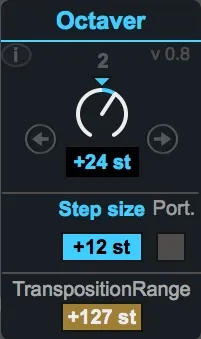
- define a step size (interval)
- eventually limit the transposition range
- navigate with the knob or next/previous step buttons to "jump" to the defined transposition interval
- a "portamento" button let you here currently playing note transposing while moving the transposition interval (work only in mono). In that way transposition knob become a note player...
---exemple :
- Step Size : +12st =octave means that you will be able to transpose incoming notes to one or more octave up or down.
set transposition range to 48 (4 octaves) means that you can transpose from -2 octave to +2 octave
- Step Size : +3st (minor 3rd) means that transposition interval could be +3, +6 +9 +12 covering by this way the "diminished chord" notes.
- Step Size : +7st (Fifth) transpose incoming note around circle of fifth
----misc :
- as usual, you can edit device name on top of the device
- designed for push2
- info : [email protected]
Comments (3)