- Type
- MIDI Effect
- Author
- TheLoser
- Version
- 1.1
- License
- AttributionNonCommercialShareAlike
- Live version
- 9.7.5
- Max version
- 7.3.4
- Downloads
- 398
- Updated
- 2018-03-08
Stop Watch is a MIDI Effect for Ableton Live by TheLoser, distributed as Creative Commons Attribution-NonCommercial-ShareAlike. It targets Live 9.7.5 and Max 7.3.4. On maxforlive.com it has 398 downloads. First published 2017-12-04, last updated 2018-03-08. 2 user comments below.
New to Max for Live? Read what MIDI Effects do, what the AttributionNonCommercialShareAlike license means, how to install a device.
Description
Hey Guys,
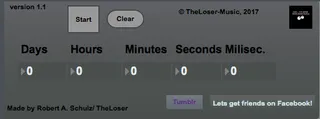
I made a new M4L device which features a stop watch directly in Ableton Live, without the need to use external applications and to switch to use/see these.
Time is the most precious worth you can have. It had always disturbed me, if i was in Live and don´t mind the time which is past, and at the end of the session I always be angry about, that I´ve left so much time, while also becoming clear, that I didn’t even made a big impact change in the project.
So, For this reason, I´ve created today the M4L Stop Watch. You can use this in a track of any kind in your project and keep the time in mind you actually sit on the project.
Edit: I checked it now it isn´t possible to apply it in an audio track in Live, but I´ll work on that and make it hopefully bug fixed in the next version.
It´s totally Freeware.
If you want to give me something back, it would be nice, if we could follow each other on Soundcloud, Facebook or Tumblr.
Thanks for taking care of me and my works.
https://soundcloud.com/theloserxxx
https://theloser-music.tumblr.com
https://www.facebook.com/theloser.inme.7
Comments (2)
Sorry for the late reply!
I didn´t noticed your comment. Sorry for that.
I´ve thought that it can do this, but i´ve tried it out now and the result is, it doesn´t.
I want to fix this bug as soon as possible.
Thank you, broah