CustomSceneMod
This device is included with your purchase of my latest rele...
- Type
- MIDI Effect
- Author
- jonbenderr
- Version
- 1.0
- License
- None
- Live version
- 9.6.2
- Max version
- 7.2.4
- Downloads
- 2
- Updated
- No Updates
CustomSceneMod is a MIDI Effect for Ableton Live by jonbenderr, distributed as freeware, with no license specified by the author. It targets Live 9.6.2 and Max 7.2.4. On maxforlive.com it has 2 downloads. Published 2017-11-26. 1 user comment below.
New to Max for Live? Read what MIDI Effects do, how device licenses work, how to install a device.
Description
This device is included with your purchase of my latest release "Connections" which I am asking a small fee for (3USD).
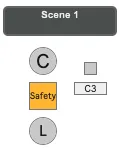
By pressing the "C" button, the device captures all clips currently playing into a sort of "scene". A good way to break away from the typical linear structure of Live's own Scene functionality.
After capturing a "scene", a "Safety" lock activates to prohibit accidental overwrite of what may have already been captured. Just click to disable the safety and you can overwrite the currently stored scene.
You can then press "L" to relaunch the custom Scene at any time. If you have many of these devices stacked, whichever custom scene is currently launched will turn white while all others turn black. You will always know which scene is currently launched.
You can assign midi note triggers for each device either by manually selecting using the number box, or clicking the toggle to allow direct input from your controller.
Brief demonstration of the device:
https://youtu.be/I4F4yPhvsj4
Comments (1)