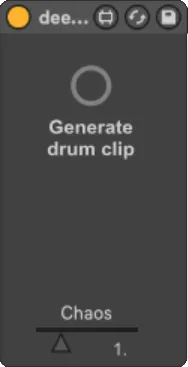
deeploops
deeploops is a drum pattern generator using AI. It creates a...
- Type
- MIDI Effect
- Author
- aiton
- Version
- 1.2
- License
- AttributionNoDerivatives
- Live version
- 10.0.1
- Max version
- 8
- Downloads
- 1
- Updated
- 2018-05-25
deeploops is a MIDI Effect for Ableton Live by aiton, distributed as Creative Commons Attribution-NoDerivatives. It targets Live 10.0.1 and Max 8. On maxforlive.com it has 1 downloads. First published 2018-03-23, last updated 2018-05-25. 27 user comments below.
New to Max for Live? Read what MIDI Effects do, what the AttributionNoDerivatives license means, how to install a device.
Description
deeploops is a drum pattern generator using AI. It creates a MIDI clip of 2 bars length. Drag deeploops.amxd on a drum track, and press on the button to create a clip. The clip contains MIDI notes for a typical ableton drum rack. You can influence how much "chaos" is in the notes. 1 is a good value to start with. With smaller values, the generated drum patterns might not vary much. With higher values, there is more randomness in the notes.
You can influence the generated notes, by creating a primer clip on the drum track. deeploops will take the notes in the primer clip and try to continue the sequence in a musically meaningfull way. Check out the included demo set for 2 examples of the primer. The primer clip should have the name "primer" to be recognized as such.
deeploops comes with a pre-trained deep neural network. The trained model is based on Google Magentas drums_rnn: https://github.com/tensorflow/magenta/tree/master/magenta/models/drums_rnn
INSTALL (PC)
============
after unzip, 2 lines are to be added to C:\ProgramData\Ableton\Live 10 Suite\Resources\Max
esources\packages\max-mxj\java-classes\max.java.config.txt, or wherever M4L is installed. First save a backup copy of the original file, and then open it with a text editor and add the following two lines:
max.dynamic.jar.dir [deeploops-root]/java/lib
max.jvm.option -Djava.library.path=[deeploops-root]/bin
where [deeploops-root] is the folder containing deeploops.amxd. Use slashes '/' instead of backslashes e.g. c:/mywork/deeploops. Restart Ableton.
INSTALL (Mac)
=============
1) Please verify that the Java Development Kit is installed and that you can work with the mxj max object. If not yet done, you have to install the max-mxj package first. See https://github.com/Cycling74/max-mxj/wiki/Install-Java
2) You have to find the max.java.config.txt file, which should be at /Applications/Ableton Live 10 Suite.app/Contents/App-Resources/Max/Max.app/Contents/Resources/C74/packages/max-mxj/java-classes/max.java.config.txt, or wherever M4L is installed. If no such file exists, load the deeploops device in Ableton first, for the location to be created, and then close Ableton again.
3) Save a backup copy of the original config file, and then open it with a text editor and add the following two lines:
max.dynamic.jar.dir [deeploops-root]/java/lib
max.jvm.option -Djava.library.path=[deeploops-root]/bin
where [deeploops-root] is the folder containing deeploops.amxd.
4) Restart Ableton.
LIMITATIONS
===========
- Generated clips are quantized, and notes have all same length.
- Only one trained genre: EDM. If you have many MIDI drum loops of any other genre, please get in touch, and we might train it for another style of music.
RELEASE NOTES
=============
v1.2: Added MacOS libraries, and generated notes are a bit longer now.
v1.1: fixed issue with detecting path to pickle file
v1.0: initial revision
KNOWN ISSUES
============
- After moving the folder of the device to a new location, restart of Ableton is necessary.
- The influence of the primer on the generated clip works best if the primer contains pitches deeploops "knows" from the training. Other notes are ignored. To find out what notes are trained, just look at generated clips.
CONTACT
=======
For now, use the device page on maxforlive.com
Comments (27)
Apparently they analyzed patterns from songs in classic genre and tribal ones. Like african rythm and patterns done live by tribes.
Could the AI actually learn from some audio files you give them or does it have to be midi ?
It would be really dope
Right now training needs MIDI files. I'm currently looking into AI methods to generate drum patterns from audio, but can't say yet that this will work reliable enough.
Great to hear that you got it to run nevertheless!
java.lang.NoClassDefFoundError: Could not initialize class org.tensorflow.TensorFlow
at Maxglu.version(Maxglu.java:126)
at Maxglu.bang(Maxglu.java:62)
Maybe you have multiple max.java.config.txt files on your system and Ableton uses a different one?
Working and impressive. (Mac OS).
For anyone on Mac struggling with install - you need Java Development Kit not just Java.
https://github.com/Cycling74/max-mxj/wiki/Install-Java
Aiton, What does "No Primer Clip Found, Start with Kick" mean?
thanks for the hint about the JDK, I updated the installation description accordingly.
java.lang.NoClassDefFoundError: Could not initialize class org.tensorflow.TensorFlow
at Maxglu.version(Maxglu.java:126)
at Maxglu.bang(Maxglu.java:62)
I am on a Mac however, what can I do here?
Then the mxj package, which is found in the Max package manager.
I know it is a bit of a hassle, sorry for that.
max.jvm.option -Djava.library.path=[deeploops-root]/bin" text incorrectly.
Do you just add it at the bottom of the config file?
Would you like to send me your file, so I can have a look? It's constanze ät
hollyhook point de
-> avoid special chars and blank space chars in paths!
-> ableton live 9: requires cycling 74, it's on board with ableton live 10
-> "max.java.config.txt":
ableton live 9: use location of Cycling '74 folder
ableton live 10: use location of ableton folder
-> i had no luck by loading deeploops as a preset device (alp), so i load deeploops.amxd always directly from deeploops-root folder
instruction details: https://pastebin.com/Mhry6Cs2
just add the new third option to "max.java.config.txt" file:
max.jvm.option -Djava.library.path=[deeploops-root]/bin
max.dynamic.jar.dir [deeploops-root]/java/lib
max.dynamic.class.dir [deeploops-root]/java/bin
and the problem with presets:
when saving the m4l device (.amxd) as a new preset (.adv), ableton imports/copy the deeploop.amxd deep into your Ableton "User Library" folder, which results in errors because of blank spaces in path, and the new preset/.adv references to this new amxd.
solution: clean/remove the new preset file and also the imported amxd file from:
User Library\Presets\MIDI Effects\Max MIDI Effect\Imported\deeploops.amxd
now create a copy of the whole [deeploops-root] folder to your "Max MIDI Effect\Imported" directory, e.g.:
User Library\Presets\MIDI Effects\Max MIDI Effect\Imported\deeploops\deeploops.amxd
and at least: import this amxd-file into ableton, save it as new preset and
tadaah :)
( the new deeploops.amxd-copy uses your initial blank-space-free path directory [deeploops-root], so just don't move it.)