articulaCtion
a straightforward MaxForLive midi device to control articula...
- Type
- MIDI Effect
- Author
- Crampe
- Version
- 1.3.1
- License
- Commercial
- Live version
- 10.0.1
- Max version
- 8
- Downloads
- 1
- Updated
- 2022-02-09
articulaCtion is a MIDI Effect for Ableton Live by Crampe, distributed as a commercial (paid) device. It targets Live 10.0.1 and Max 8. On maxforlive.com it has 1 downloads. First published 2018-03-22, last updated 2022-02-09. 19 user comments below.
New to Max for Live? Read what MIDI Effects do, what the Commercial license means, how to install a device.
Description
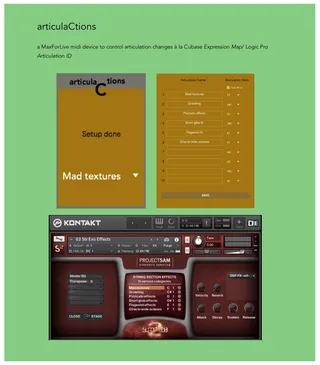
a straightforward MaxForLive midi device to control articulation changes/keyswitches à la Cubase Expression Map/ Logic Pro Articulation ID.
Easy to set up. Control your big sampler (Kontakt, EastWest Play, MachFive, UVI...) librairies articulations/keyswitches with automation lanes, from the device, Push or any midi controller.
v1.3.3:
MPE compatibility
v1.3:
- 10 more articulation slots (total = 20)
- small GUI issues fix
v1.2:
added Push mapping (After setting your articulations names, you might need to select another track or device and come back to your track/device for the articulations to appear correctly on your Push display.)
V1.1:
various bug fixes
Live 8 minimum
Comments (19)
That's very straightforward:
- Put the device before your e.g Kontakt.
- Enter your articulations' names and their corresponding note number in the settings window. Click save and you're done.
- Now you simply change your articulations/keyswitches by drawing automations (the articulations names appear), from the device menu chooser, or from Push (were the articulations names are also displayed).
I'm aware of this issue, this is due to the fact that I'm populating the articulations in a hack-y way in order to have them displayed on Push while still being able to change them dynamically.
Simply selecting an other track and going back to your original one is another way to solve this "bug", no need to save.
Would it be possible to increase the maximum number of articulations from 10 to something like 30?
Sorry I didn't notice your message.
No worries, that's the beauty of M4L !
Could you please change the background colour for the text? It's really difficult to read.
https://imgur.com/OLAXRaS
Sorry I havent noticed your message earlier.
I'll patch an update with more articulations asap (and no I didn't promised anything previously).
@rockguycris: and I'll fix this color thing at the same time
cheers
j
Anyway - great tool and thanks again for sharing with us all.
10 more articulation slots available (20 total).
Changed the choosers background color.
@Audioguy:
unfortunately M4L is still very limited in this regard, and I'm afraid this is not something possible atm.
Now I tried it with the VSL Synchron Player, and it works, but affects only the first articulation of the interface. How would you affect all articulation slots further to the right of the Synchron Player?
I'd be glad to post a screenshot of the interface, if possible
Sorry I don't have the VSL player to check.
What midi messages those 2nd and 3rd columns (this is what you're talking about, right?) are expecting?