Touch OSC Metering and Spectrum Analzyer
An all in one metering utility for Ableton Live through Touc...
- Type
- Audio Effect
- Author
- Technoir
- License
- Commercial
- Live version
- 10.0.1
- Max version
- 8
- Downloads
- 2
- Updated
- 2018-09-02
Touch OSC Metering and Spectrum Analzyer is an Audio Effect for Ableton Live by Technoir, distributed as a commercial (paid) device. It targets Live 10.0.1 and Max 8. On maxforlive.com it has 2 downloads. First published 2018-06-08, last updated 2018-09-02. 2 user comments below.
New to Max for Live? Read what Audio Effects do, what the Commercial license means, how to install a device.
Description
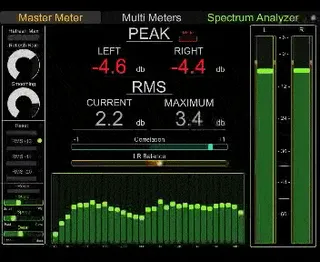
An all in one metering utility for Ableton Live through Touch OSC that is controlled through a simple master hub. Includes peak and RMS metering, a spectrum analyzer with tweakable detail, a correlation meter and a left right balance meter.
A small channel selector allows you choose additional channels to monitor in the Multi Meters page in the app. (Only for use with iPad template).
For iPhone and iPad.
INSTRUCTIONS: The easiest way to use this is by putting the max for live plugins on the master channel. The spectrum can be dragged to any channel and it will link with the master channel. The multi-metering plugin works best when grouping the channel you want to monitor and placing it on the group channel. It also works well by creating a dummy channel that takes input from the channel you want to monitor and placing the multi meter plugin on that. When connecting to the plugin make sure the IP addresses and ports are correctly routed or they won't connect.
v2: Under the hood tweaks. Cleaned up UI. Added two types of spectrum analysis. Simple uses less CPU and shows reduced frequency range (some might prefer this or find it more useful than the higher detailed). Detailed is the original spectrum. Both iPad templates now allow you to see a miniature version of the spectrum in the main window so all metering can take place on one screen.
v1.2: Fixed bug where channel selector would not remember previous settings when saved with project file.
v1.1: Tweaked the iPad layout of the Multi Metering page to be clearer when channels are active.
Comments (2)
I have touchosc working perfectly with Ableton through LiveControl. Other layouts work fine. But I simply cannot get any reaction from this... I have tried editing the IP in the plugin window, didn't make any difference. Maybe you could give me some more specific help that would get this up and running as I was really excited to get it going - hence paying you for it!
I also bought this and can't get it work properly...
Nothing moving in the layout like @diskorduk
A tutorial would be very appreciated ! :)
Thanks for your others products by the way, nice tools !