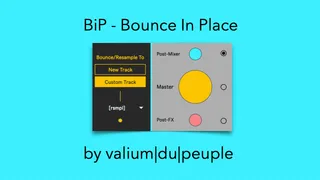
BiP - bounce in place
Everyone's waiting for a "bounce in place" feature in Abl...
- Type
- Audio Effect
- Author
- Crampe
- Version
- 1.8
- License
- Commercial
- Live version
- 9
- Max version
- 8
- Downloads
- 1
- Updated
- 2023-12-24
BiP - bounce in place is an Audio Effect for Ableton Live by Crampe, distributed as a commercial (paid) device. It targets Live 9 and Max 8. On maxforlive.com it has 1 downloads. First published 2018-06-07, last updated 2023-12-24. 69 user comments below.
New to Max for Live? Read what Audio Effects do, what the Commercial license means, how to install a device.
Description
Everyone's waiting for a "bounce in place" feature in Ableton Live since ages.
Well, if you have M4L, here's the one-click-only solution device, with easy Push1/2/3 implementation!
Place the device on your master track (you can put it anywhere actually), key/midi map it, save it in your default template and you're done!
When you want to bounce something, just place your playhead on the desired track and press you key/midi mapped button - or Select+Rec on Push - done!
Also works with multiple tracks
Automatic naming : your new bounced audio file will conveniently be named "[rsmpl] name-of-the-recorded-track".
At the moment BiP is designed to work in Arrangement view only.
More recording modes and Destination Track options added in v1.5, check below.
RELEASE NOTES:
v1.8 (dec 2023):
- make sure the Destination Track (when set to "Custom") gets unsolo'ed if needed before bouncing starts
- make sure that the correct track(s) get unsolo'ed depending on the context
- automatically links to the connected Push version and adds P3 support.
- Push Trigger wasn't working correctly
- lots of little fixes that just make everything more clean
- (BiP for L9 won’t be updated anymore and the last version is v1.7.1)
v1.7 (june 2021):
- Push trigger mode setting wasn't recalled correctly
- Better Undo handling (the recording process could be re-triggered when undoing)
v1.6:
- BiP now unarms any armed track before doing its thing so you won't never ever again end up with unwanted recording on tracks that were left armed somewhere in your sets, out of focus.
NEW IN V1.5:
- YOU CAN NOW CHOOSE THE DESTINATION TRACK TO BE:
° A USER-DEFINABLE TRACK ("CUSTOM TRACK" + DROP-DOWN MENU). THIS ALLOWS TO ALWAYS BOUNCE ON THE SAME TRACK, WHICH ALSO MAKES THE PROCESS FASTER.
° THE OLD WAY WHERE A NEW TRACK IS CREATED FOR EACH BOUNCE ("NEW TRACK")
- THE DESTINATION TRACK NAME IS NOW PREPEND WITH "[BIP]" IF IT'S A SINGLE TRACK BOUNCE; WITH"[RSMPL]" IF IT'S A MULTITRACK BOUNCE.
- NEW "MASTER" (BIG BIP CENTER BUTTON) BUTTON TO RESAMPLE THE MASTER TRACK OUTPUT; I.E PERFECT TO BOUNCE MULTIPLE SOLO'ED TRACKS.
- YOU CAN NOW CHOOSE WHICH RECORDING MODE IS TRIGGERED FROM THE PUSH SHORTCUT.
NEW IN V1.3:
- FIXES THE UNWANTED RESAMPLING/BOUNCING ACTION TRIGGERED WHEN LAUNCHING A SET.
NEW IN V1.2:
- THE DEVICE COULD WORK UNEXPECTEDLY IF THE -ENABLEARMONSELECTION OPTION WAS ACTIVE IN LIVE’S OPTIONS.TX
- ADDED A LIVE 9 VERSION (SEPARATED DEVICE), IT SHOULD EVEN WORK IN LIVE 8 (BUT I HAVEN'T TESTED).
NEW IN V1.1:
- YOU CAN NOW CHOOSE TO RESAMPLE (WHITE BUTTON), OR TO BOUNCE POST-FX (YELLOW BUTTON).
- SELECT+RECORD ON PUSH, NOW TRIGGERS THE BOUNCE OPERATION INSTEAD OF RESAMPLE.
For Ableton Live9, Live10 and Live11.
Video demo here: https://youtu.be/0Lpu0E0p8xg
Comments (69)
The only issue I'm running into is that I've added this to my main template & every time I open up Ableton it seems like the device is automatically getting activated somehow as it immediately starts to do it BIP thing. However, it doesn't solo & rename the track tho like it does during normal use.
I'm on Live v10.0.2 (2018-05-11_f78673c6cd) on Mac OS X 10.13.5 (17F77)
I could look at the device initialisation and timing things, but I've never experienced this and you're the first and only reporting this.
Do you have any other M4L device that could interact with in your template?
I Initially thought it was the Futility 2 device (which I had forgotten was also yours btw!), but it wasn't that device causing the issue.
After leaving only the BiP device and having it still happen I think it's safe to say this is what's causing it. Also, I don't think there'd be any other device that could create a new track, set it to Resample mode and click the Arrangement Record Button.
Not sure if it was the key-mapping causing the issue or if I just need to do a clean install of the device, but either way it is working now!
It's called Arm-Me (MIDI version): http://maxforlive.com/library/device/2859/arm-me
Think you can take a look at this and see if there is a work around? I use this to keep Cthulu armed so that I can have it ready to play.
I suppose having you Cthulu track monitoring set to On isn't an option?
Unfortunately I can't guarantee that this kind of interaction with other M4L devices won't happen.
I'll have a look though, but not in the upcoming days as I'm on a tight deadline.
For the time being I suppose you'll have to live with this annoying Live start up issue.
Coming back to you asap.
Couple of questions.
1. Is it possible to add a toggle box to either add / not add the "[rsmpl]" text in front of the new audio track? I've found my workflow is simply renaming it to what the source group / track was and then immediately deleting the source group / track afterwards. i.e. Group of 3 clap tracks in a group names "Claps" > BiP > new tracks named "Claps"
2. Would it be possible to auto-enable the Loop switch? Using BiP I've found my workflow to be 1.) Select the region. 2.) Toggle Punch-In & Punch-Out switches. 3.) trigger BiP. So, the resulting audio file is already the correct length, but then I just need to enable the Loop switch virtually every time. Speaking of, auto enabling / disabling the Punch-In/Out switches would also save a step.
Freaking LOVE this device already. Been using it literally non-stop. It saves so much time it's ridiculous.
:)
Yeah I probably could make the [rsmpl] optional.
Let's wait for the next update.
I'm in live 10 - the device doesn't seem to solo the track with either button. Im just getting a full resample of the whole track. Any ideas?
Sorry, I haven't notice your message earlier. Is it solved for you?
Do you have exclusive solo activated in your preferences?
your device is essential for electronic/experimental music, thank you!!
Just a question/request: is it possible to implement a "MIDI bounce" feature? the two "O" are for audio and maybe the "I" for the MIDI.
I keep thinking about it because with arps and complex sequencers I need to route MIDI everytime if I want to save a sequence and keep experimenting, or simply to duplicate for another layer and modify it.
Mapping a button could be veeeery handy!
Any chance?
Thank you
I don't know if it is related to the bug on your other device Futility II that turns on muted tracks when I reopen a project.....
FYI: the two buttons are mapped to keyboard's keys.
Yeah, this is an issue with computer keyboard mapping and the way the live.button behaves. I have to patch something to hack this behaviour.
Think there is a similar issue with your Futility II device that un-mutes every track each time a session is re-opened. Is this an easy fix? :D
If I put BiP on the master — as is suggested in last year's youtube video — and choose "Bounce" I get no recording and occasionally an audio feedback loop and if I choose "Resample" I get no recording. If I put BiP on the track iinstead it's pretty much the same, but I get no occasional feedback.
If I manually record in this setup, I can do this. The problem — beside the feedback loop, that could be solved with monitor always be set to "off" — is that recording never starts. I naturally checked my Recording settings, but neither with "Playback with Record" on or off nor with Solo/Arm exclusive or not, will there be any difference.
In addition, when using this with multiple clips there is always an additional audio track created and on top of that BiP solos the previous audio track instead of the instrument track. I don't see how you need to create a new audio track when there is one already?
I would like a recording to stop some bars after the original clip length or after the length of a user setting and that the audio track is reused.
Can we work to make this happen?
The length bit is elegantly solved with Punch-in and Punch-out.
- Yeah BiP is not supposed to be used in Session view... this is however already on the top of my to-do list ;-)
- the reason why I didn't made it so the recording stops automatically, following the "source" clip's length is that, it's fairly common to bounce in place a source that has e.g reverb or delay on it.
But I could think about adding a setting that would let you set a default "time to wait after the clip's end".
did it worked in the end?
Either way, thank you for making this device and saving me a lot of time!
Sure, I'll look at what I can do about this.
Greetings.
I start using it. There is just one think I dont like about it...
Would it be possible to make an option to record the Master PRE FX?
I have some Plugins like Sonarworks and its not that handy when I have to deactivate the plugins in the Master everytime I want to use BIP.
Thank you - great work!!
Yeah, I think I'll add more routing options in a future version as you're not the first one asking for this.
I just want to make sure to implement this without complexifiying the device.
How often is this happening?
Are you sure you didn't press one of the resample buttons while the global record (+automation record) was on? This would create an automation on the resample button and then look like BiP is being triggered "randomly".
If it's midi mapped, can you make sure that your midi controller isn't sending messages when it shouldn't.
Love this device but I have a problem....
After Bouncing, if you undo 4 times it re-triggers the bounce. The easy solution is to delete rather than undo the BIP but it can get messy if you're undoing processes that came after BIP & then it hits BIPs undo's. Is there a way of having BIP not leave anything in the undo history?
Best, P.
:-)
That's surprising. Which Live (and Max) version are you using?
Win or Mac?
I can't reproduce in L11/10.
I'm on Mac (10.15.7), Live 11.0.6, Bundled Max 8.1.11.
I'll DM you a few video's showing what's happening, one showing the behaviour ofter 5 undo's (not 4 as I'd previously reported) & another when BIP is part of a larger undo history.
Thanks, P.
Thanks, P.
I can buy other things at gumroad just fine.
Cheers from Cologne :-)
Markus
Do you see my contact email in Gumroad?
Thanks, shodty
-shodty
I think your pressing the button(s) with your mouse, right?
Maybe I didn't make it clear enough in the documentation, but BiP is meant to be used with key/midi mapped shortcuts, not to be used with the mouse... that would totally ruin the idea which is to improve workflows by giving a quick bounce-in-place (simply by pressing a dedicated key).
(FYI, since M4L GUI buttons have never been designed to be used as shortcuts, making them work this way requires a workaround... and this workaround makes pressing the buttons with the mouse not react as you would expect.)
Got it! Old habits die hard haha, I'm so used to using a combination of mouse and keyboard together that I overlooked this. Thanks for the quick response, I'll map it to some keys!
write me an email by answering to your Gumroad receipt.
I just would like to know if there's a way not to use the automatic written of the tracks starting by "(bip)".
Thanks in advance !
I didn't get any report like yours.
Even though it worked with older Live version, why aren't you updating to the latest one (L11.1.6)?
- Bouncing multiple tracks individually isn't possible, but you can bounce multiple tracks together, though.
- Are you sure you're not hovering too hard? 😄
Is it possible to copy the sends settings from the original track when creating a new bounce track?
I can't seem to get the bounced tracks to null. Am I doing something wrong?
Are you bouncing a track that has analog emulation plugins?
The volume of the track is different?
Post VS pre-mixer?
etc...
There's a reason, but that is not BiP's process itself, as it's simply recording the output of a track.
Please let me know what I am getting wrong? And thank you so much
I have a group of vocals in Ableton live. On that group(aka bus) is an effect chain. I also have an effect chain on my master as well. This is what I'm wondering…
Will you please explain to me like I'm a brand new engineer trying to figure things out what happens when I select the three options in your plug-in? Basically what do I get in the bounce for the post mixer and then what do I get from the master and then what do I get for the post effect? . See attached picture. Thank you so much I really appreciate your time
BiP doesn't do any magic, it just automates a certain number of steps in a sequence.
So, the routing options are exactly the same options that you would choose if you were manually bouncing/resampling/recording the output of a track(s).
Post-mixer= sound is recorded after the volume fader of a track (knowing that the volume fader is the "last" bit of a track, it means that the effects of the track are included).
Post-effect= the FX are included, but the track's volume fader is ignored. The output volume (the recording's volume) is determined by the volume at the end of the FX chain.
Master/Resample mode= the sound is recorded at the output of the master.
The Post-Mixer option curiously never gets routed for me - its been either Resampling or Post-FX. Am I missing a step there? I have the postmixer option mapped to 6 on my keyboard.
Also, would you consider an update where it creates a muted resample track? Would be cool to hear things in context while resampling so I could perform some live automation.
Cheers!
Keep up the amazing work
Look closer ;-)
The post-mixer uses resample routing (i.e the Master output) because it's actually post-mixer + returns; so the track is soloed before recording.
Resample Mode doesn't solo any track, so the routing also is "resample" so that you can BiP multiple tracks.
I feel like this explanation isn't very clear!
Thanks for getting back so quick! my bad, I think i explained it incorrectly ha!
I'm wondering if its possible for BIP to use the Post-Mixer option that you'd usually select after choosing your input type from the i/o dropdown menu. I'd like for the newly routed track to record the track volume slider position & track fx but not any master fx.
also if the above is possible - I was thinking that when BIP is triggered, instead of soloing the selected track so it sends to the resample channel, it would arm the new track but turn off the track activator so it records while you listen/make contextual changes. (if this is an entirely different idea than BIP then plz pay me no mind hahah)
Either way i'll be using this!!
Yeah I'd love that too, but it's not currently possible (as you know it's only possible in Live when Exporting)