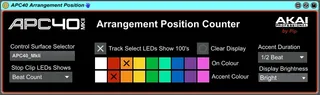
APC40MkII Arrangement Position Counter
This device turns your APC40 MKII into a LED type numeric di...
- Type
- MIDI Effect
- Author
- Pip
- Version
- 1.1
- License
- None
- Live version
- 9.7.6
- Max version
- 7.3.5
- Downloads
- 769
- Updated
- 2019-09-24
APC40MkII Arrangement Position Counter is a MIDI Effect for Ableton Live by Pip, distributed as freeware, with no license specified by the author. It targets Live 9.7.6 and Max 7.3.5. On maxforlive.com it has 769 downloads. First published 2018-06-24, last updated 2019-09-24. 9 user comments below.
New to Max for Live? Read what MIDI Effects do, how device licenses work, how to install a device.
Description
This device turns your APC40 MKII into a LED type numeric display for the bar count of the arrangement in Ableton. In other words you can keep track of where you are in a song visually by the bar count.
I knocked this together so I could easily see where I was in a song, with a view to deriving visual cues, when I was away from the controller doing other things.
You can configure it to visually emphasise the first beat of each bar. It can also make the “Clip Stop” buttons act as a chaser or beat count, again to aid you see where you are in the song, bar, beat etc. etc.
I haven’t changed the mode of the control surface. The program just overwrites the display. The buttons will still function as normal for clip and track select etc. So you can punch through the display if you still want control things in Ableton. If you don’t want Ableton to interfere with the display, then it is best to navigate the active rectangle for the APC40 to a blank area where there are no clips present.
Anyhow it’s just an experiment, and another project for me play with Max for Live. I thought it may be useful to other people hence putting it up on here.
If you have any ideas of how I could improve this, then let me know.
Have fun.
Update V1.1
By request I have added a "Bar Count Off" option in the display brightness menu.
Comments (9)
it works and I like it - thank you very much for sharing!
Also thanks for letting me know it works on your set-up. :-)
Sorry it took so long, I didn't see your post until this week.
Cheers
Pip