Transport Widget
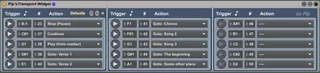
This little widget allows you to map midi notes to some basi...
- Type
- MIDI Effect
- Author
- Pip
- Version
- 1.0
- License
- None
- Live version
- 9.7.7
- Max version
- 7.3.5
- Downloads
- 688
- Updated
- 2019-08-22
Transport Widget is a MIDI Effect for Ableton Live by Pip, distributed as freeware, with no license specified by the author. It targets Live 9.7.7 and Max 7.3.5. On maxforlive.com it has 688 downloads. Published 2019-08-22. 7 user comments below.
New to Max for Live? Read what MIDI Effects do, how device licenses work, how to install a device.
Description
This little widget allows you to map midi notes to some basic transport functions, such as:
• Stop (Pause)
• Continue
• Play
• Jump to a locator
I am using Ableton 9 and I couldn’t find an easy way to auto stop the transport in arrangement mode without routing midi out and back in, which seemed messy.
If you are constructing a set in arrangement mode you will probably be familiar with the issue of running straight into the next song even if you are not ready. I built this widget so that I could trigger a stop by simply putting a note in a dummy midi track. I added some other transport functions for good measure, such as jump to a locator, play. The jump to locator allows you to rearrange your set without having to restructure your arrangement. It is also possible to use dummy clips in a midi track to start at any point in your set, just set a locator and map a note to it in the widget. I realise you can do this with regular midi mappings, but the widget makes it more explicit.
The note to action mappings are stored in a little database within the widget. You can have any note do any action. Each line in the interface shows the selected note to action mapping in the database. The mappings persist even if the user interface is not displaying them.
There is 4 beat mask (configurable) on the play action. This is to stop undesired looping when using a midi clip.
It turned out to be a bit of a challenge to get the locator points to auto populate the action menus, and allow for renaming and deleting. I got there in the end!
It has not been extensively tested, so if you find any bugs please let me know.
Comments (7)
Have a look at Transport Widget MCV Version 2.3
https://www.maxforlive.com/library/device/5948/transport-widget-mcv
I think this will do what you are asking.
Cheers
Pip
Drop me an email, it may be a quick tweak to the MCV Version to get you to where you need to be.
I need to get my head around how you would like it to work.
P