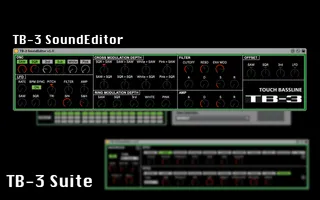
TB-3 SoundEditor
You can set many Roland AIRA TB-3 parameters including hidde...
- Type
- MIDI Effect
- Author
- mugenkidou
- Version
- 1.0
- License
- None
- Live version
- 10.0.1
- Max version
- 7.3.5
- Downloads
- 1,183
- Updated
- 2019-11-19
TB-3 SoundEditor is a MIDI Effect for Ableton Live by mugenkidou, distributed as freeware, with no license specified by the author. It targets Live 10.0.1 and Max 7.3.5. On maxforlive.com it has 1,183 downloads. First published 2018-06-30, last updated 2019-11-19. 3 user comments below.
New to Max for Live? Read what MIDI Effects do, how device licenses work, how to install a device.
Description
You can set many Roland AIRA TB-3 parameters including hidden parameters.
To send all patameters concurrently, push TB-3 logo.
Push "LFO", "CROSS MODULATION DEPTH", "RING MODULATION DEPTH", "CV OFFSET" text, you can initialize related parameters.
Check TB-3 Suite, TB-3 related devices created by mugenkidou.
TB-3 SoundEditor
http://www.maxforlive.com/library/device.php?id=4817
TB-3 EffectEditor
http://www.maxforlive.com/library/device.php?id=4818
TB-3 PatternEditor
http://www.maxforlive.com/library/device.php?id=4819
TB-3 ParameterAssigner
http://www.maxforlive.com/library/device.php?id=4820
Comments (3)
I don't know how you figured out all of those parameters but this opens up the TB-3 as a "real" synthesizer for the first time. I was hoping for something like this.
I am getting a few hanging MIDI notes here and there. Do you have any tips about that? These four devices are intended to be used together in a chain, right? I just threw on an external instrument device on the end of them and set my TB-3 to local off.
Otherwise everything looks good, although I've only gotten a chance to explore this one device much so far.
Thanks!
i have attempted to set it up in ableton, but having some issues.
Put it on a midi channel, add an 'external instrument rack' after it. Assign midi out to the tb3, hit play in the DAW and it plays the pattern on the tb3. When i hit the TB3 icon within your plug in all audio stops even though you can see that the tb3 is being activated. i have tried routing the audio out to the mixer within the External instrument rack and directly to an audio channel but no joy. Any tips please?