- Type
- MIDI Effect
- Author
- mugenkidou
- Version
- 1.0.4
- License
- None
- Live version
- 10.0.1
- Max version
- 8.0.0
- Downloads
- 1,103
- Updated
- 2018-07-01
TB-3 Editor is a MIDI Effect for Ableton Live by mugenkidou, distributed as freeware, with no license specified by the author. It targets Live 10.0.1 and Max 8.0.0. On maxforlive.com it has 1,103 downloads. First published 2018-04-06, last updated 2018-07-01. 4 user comments below.
New to Max for Live? Read what MIDI Effects do, how device licenses work, how to install a device.
Description
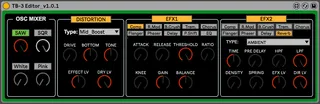
You can set hidden parameters of TB-3.
- Oscillator Mixer
- Distortion
- EFX1
- EFX2
It works with Ableton Live 10 or later.
v1.0.2
- Fixed a typo
v1.0.3
- Fixed: Sometime EFX1/EFX2 does not work
V1.0.4
- Fixed: Many UIs are connected to wrong parameters
Check TB-3 Suite, TB-3 related devices created by mugenkidou.
TB-3 SoundEditor
http://www.maxforlive.com/library/device.php?id=4817
TB-3 EffectEditor
http://www.maxforlive.com/library/device.php?id=4818
TB-3 PatternEditor
http://www.maxforlive.com/library/device.php?id=4819
TB-3 ParameterAssigner
http://www.maxforlive.com/library/device.php?id=4820
Comments (4)
You can set EFX2 with same way.
First, click EFX1 button to activate effects. The button turns to orange.
Second, select one from ten effects. The selection is orange, also.
Now you can set each parameters to fit your sound.
That's it.
Wondering where the filter cutoff, resonance, accent and effects settings are?