- Type
- Audio Effect
- Author
- opticon93
- Version
- 21.3
- License
- AttributionNonCommercialShareAlike
- Live version
- 11.3.4
- Max version
- 8.5.3
- Downloads
- 463
- Updated
- 2023-07-22
EQ is an Audio Effect for Ableton Live by opticon93, distributed as Creative Commons Attribution-NonCommercial-ShareAlike. It targets Live 11.3.4 and Max 8.5.3. On maxforlive.com it has 463 downloads. First published 2018-08-11, last updated 2023-07-22. 2 user comments below.
New to Max for Live? Read what Audio Effects do, what the AttributionNonCommercialShareAlike license means, how to install a device.
Description
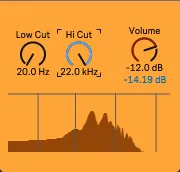
24db Low cut and 24db Hi cut. Technically, it probably should just be called a bandpass filter without gain/resonance at the cutoff points.
Update: I went ahead and added a volume knob. Below that is a little Peak Meter. Click on it to reset it.
Comments (2)
i just modified the initial value of the hi cut to 20000Hz and the inititial volume to 0dB with the max inspector (then freeze the device and save)
But i dont know how to make the filters move faster with the mouse .
If you hold the CTRL key down while mousing, it will go faster. The problem is that I want it to be "fine grained" so that I can hit all (most) of the values.
The only other way I know to make it faster is to change the number of "Steps" on the dials (in the Inspector) to a smaller amount. But then it skips a lot of values, for example going from 303hz to 307hz with no intermediate values.