Magenta Studio
Magenta Studio is a collection of music plugins built on Mag...
- Type
- MIDI Effect
- Author
- magenta
- Version
- 2.0
- License
- None
- Live version
- 10.6
- Max version
- 8.0.3
- Downloads
- 2
- Updated
- 2025-06-30
Magenta Studio is a MIDI Effect for Ableton Live by magenta, distributed as freeware, with no license specified by the author. It targets Live 10.6 and Max 8.0.3. On maxforlive.com it has 2 downloads. First published 2018-11-15, last updated 2025-06-30. 14 user comments below.
New to Max for Live? Read what MIDI Effects do, how device licenses work, how to install a device.
Description
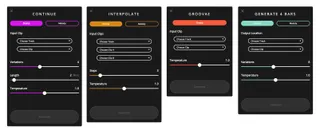
Magenta Studio is a collection of music plugins built on Magenta’s open source tools and models. It use cutting-edge machine learning techniques for music generation. These tools are available both as standalone applications and as plugins for Ableton Live.
Magenta Studio contains 5 tools: Continue, Generate, Interpolate, Groove, and Drumify, which let you use the Magenta models on your MIDI clips from the Session View.
* Continue: Add bars to an existing melody or drum pattern.
* Generate: Create new melodies and drum patterns from scratch.
* Interpolate: Blend melodies and drum patterns to morph between them over time.
* Groove: Add microtiming and velocity to quantized drum patterns.
* Drumify: Convert non-drumming clips into drumming patterns.
**Note** Requires choosing Max v8.0.3 from Ableton's preferences. Starting in Live 10.1 this requirement will go away.
Comments (14)
You need Live Suite 10.0.4 and up in order to be able to change settings to use official Max 8 version instead of bundled version.
@roesenthaller
No. You need Ableton Live Suite 10.0.4+ and official Max 8. You can download and install Max 8 from cycling74 website for free but, if you open it, you can't save anything. Now, since Ableton Live Suite includes MaxForLive, when you open the devices in the Max 8 editor (again, via Ableton Live), you can edit those patches and save them. Right now official Live version is 10.0.5, and beta version is 10.0.6b3.
@magenta
Please do release win 10 version soon :)
https://magenta.tensorflow.org/studio/ableton-live
YESS!
:D
Seriously, though, is there any chance anyone might be able to make this work for Live 9.5 (if it won't already)?
This is exactly the sort of toolset I've been looking for. Really hoping there is some way I'll be able to use it without buying an upgrade to Live 10.