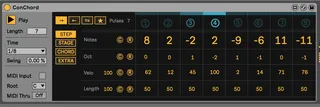
ConChord by Max for Cats
ConChord is a pulse-based Max for Live chord step sequencer....
- Type
- MIDI Effect
- Author
- maxforcats
- Version
- 1.0
- License
- Commercial
- Live version
- 10.0.1
- Max version
- 8
- Downloads
- 3
- Updated
- 2018-11-16
ConChord by Max for Cats is a MIDI Effect for Ableton Live by maxforcats, distributed as a commercial (paid) device. It targets Live 10.0.1 and Max 8. On maxforlive.com it has 3 downloads. Published 2018-11-16. 9 user comments below.
New to Max for Live? Read what MIDI Effects do, what the Commercial license means, how to install a device.
Description
ConChord is a pulse-based Max for Live chord step sequencer. The MIDI effect offers 8 steps, which are triggered by pulses and each step can have a different stage with a variable pulse length from 0 to 7 pulses per step. You can of course adjust Time, Swing as well as the play direction. This allows for quite interesting musical results since it is very easy to introduce complexity within the simple pattern of an 8 step sequencer with a maximum of 56 pulses.
With the carefully chosen feature set, you are in full control of ConChord. The features from the pages of the MIDI effect can be mixed and matched, making very complex patterns possible.
Comments (9)
(i dont want to have to use the mouse all the time to change settings but would love to have a step sequencer which is fully controllable with a midi controller.)
All the bugs seem at random.
At one point could not route the track I had the sequencer on, to a bus, even though it was in the bus' group folder.
Once I start modifying many features, using "random", and making scale adjustments, Ableton's "undo" feature stops working properly.
I get asked to "save the changes made" every time I exit Ableton even though I have not touched anything in my project.
Unstable otherwise, too many other specifics to name, but not being able to use "undo" is too big of an issue.