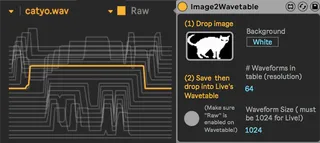
Image2Wavetable
Turn an image into a wavetable to be used by Live's wavetab...
- Type
- Audio Effect
- Author
- ndivuyo
- Version
- 1.0
- License
- None
- Live version
- 10.1
- Max version
- 7.3.5
- Downloads
- 6,169
- Updated
- 2019-03-04
Image2Wavetable is an Audio Effect for Ableton Live by ndivuyo, distributed as freeware, with no license specified by the author. It targets Live 10.1 and Max 7.3.5. On maxforlive.com it has 6,169 downloads. First published 2019-02-27, last updated 2019-03-04. 6 user comments below.
New to Max for Live? Read what Audio Effects do, how device licenses work, how to install a device.
Description
Turn an image into a wavetable to be used by Live's wavetable (and others). With the new Ableton Live update users can drop their own wavetables on the native Wavetable Instrument. Simply drop an image, save as wave, and then drop that file onto Ableton Wavetable (must be Live 10.1 or higher!) Oh, and make sure "Raw" is enabled on the Wavetable or it won't look right!
Super simple device. Could of course be expanded, so have fun doing that if you are inclined.
NOTE: Some transparent background PNGs won't work! Just save them as jpegs.
Collaboration by me (Dillon Bastan) and Carlo Cattano
Not thoroughly tested, if you have issues email me: [email protected]
Comments (6)
(works fine in 10.1b13 beta on Windows 10)