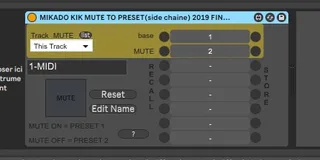
MIKADO KIK MUTE TO PRESET recall
Store PRESET of the FX Placed Just at the RIGTH ...
- Type
- Audio Effect
- Author
- spiralune
- Version
- 20191.0
- License
- None
- Live version
- 10.0.1
- Max version
- 8
- Downloads
- 155
- Updated
- 2019-02-19
MIKADO KIK MUTE TO PRESET recall is an Audio Effect for Ableton Live by spiralune, distributed as freeware, with no license specified by the author. It targets Live 10.0.1 and Max 8. On maxforlive.com it has 155 downloads. First published 2019-02-17, last updated 2019-02-19.
New to Max for Live? Read what Audio Effects do, how device licenses work, how to install a device.
Description
Store PRESET of the FX
Placed Just at the RIGTH OF THIS PATCH
------------------------------------------------------------
Select the Track
you want OBSERVE the MUTE Live Track BUTTON
to Link with PRESET 1 and PRESET 2
////////////////////////////////
attention
Store Preset 1 of this PATCH before MUTE TRACK
make sure have original State of FX in "Preset 1"
////////////////////
exemple
WHEN USE KIK TRACK
AND YOU HAVE MORE TRACK WITH COMP SIDE CHAINED BY KIK
when MUTE the KIK it's possible some TRACKS
have " undesired GAIN or frequency UP Gain "
************************************
**********************************
This Patch made To
EASLY EQUILIBRATE MIX WHEN
""réference Side Chain KIK " IS MUTE
Or cool for Sound disign effect........
**************************
***********
Exp:
when you MUTE THE KIK = a TRACK SYNTH have so More Energy
1- put an UTILITY (ableton) to TRACK SYNTH
2- put this PATCH just at the Left of UTILITY
and select The TRACK ((KIK)) where Observe the MUTE TRACK BUTTON
3- make sure the KIK is unMuted (listen) and Store PRESET 1
it save the state of UTILITY on Preset 1
4- play the track and MUTE THE KIK
5- ajust UTILITY GAIN (of the SYNTH )
6- Store PRESET 2
Now when the Mute / unMute the KIK
alternate PRESET 2 / PRESET 1
you can repeat operation on a EQ to another Track
** Cool the MiX is auto Equilibrate when the KIK is MUTE and unMUTE
-----------------------------------
now test with an EQU or disto , delay .......
*************
INFO
the Patch Don't save All the Parameter in Effect Rack..
if a FX just at the Rigth iS an Ableton Effect Rack
Only 8 macro is STORED