Timeline Navigator
Navigate arrange view with the MIDI mappable controls of thi...
- Type
- MIDI Effect
- Author
- Intrakranial
- Version
- 0.0.2
- License
- AttributionNonCommercialNoDerivatives
- Live version
- 10.0.1
- Max version
- 8.0.0
- Downloads
- 857
- Updated
- 2019-07-16
Timeline Navigator is a MIDI Effect for Ableton Live by Intrakranial, distributed as Creative Commons Attribution-NonCommercial-NoDerivatives. It targets Live 10.0.1 and Max 8.0.0. On maxforlive.com it has 857 downloads. First published 2019-07-15, last updated 2019-07-16. 4 user comments below.
New to Max for Live? Read what MIDI Effects do, what the AttributionNonCommercialNoDerivatives license means, how to install a device.
Description
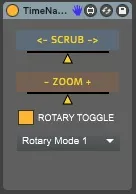
Navigate arrange view with the MIDI mappable controls of this device.
Move the SCRUB slider right for scrolling right and viceversa.
Move the ZOOM slider right for zooming in and left for zooming out.
You can use both absolute value knobs and rotary encoders for MIDI mapping the sliders. If you're using rotary encoders, switch the ROTARY TOGGLE on and select the appropriate RELATIVE MODE* for your controller. Rotary encoders work way better so we highly suggest you look into it.
*RELATIVE MODES:
- Relative Mode 1: for controllers with encoders using > 64 for increment and < 64 for decrement.
- Relative Mode 2: for controllers with encoders using > 1 for increment and < 127 for decrement.
// These were tested on a Arturia Beatstep Pro which support both modes (selectable per knob from the Midi Control Center).//
(tip: once the cursor is set via the device dial use CTRL/CMD + Spacebar for playing from that point)
Please feel free to send us feedbacks at:
Changelog:
0.0.1: Initial beta release, only horizontal scroll supported
0.0.2: Zoom feature added, rotary encoders support added
TO-DO:
- Push support
- advanced custom controls (Knob idle zone width, etc..)
- feel free to send us your requests :)
Comments (4)
thanks
Is it possible to do a Button version (with options of toggle/gate mode)
It can be very cool for keyboard mapping users ! Please !!!!!!
If I scrub to the right once, then the slider will be moved to the right side. If I come back a second time and try to scrub left, because that slider is still off to the right from the last time I scrubbed, even when I move it leftwards, Live keeps scrolling right until the slider crosses that midway point again. Both sliders do this.
Unless they reset every time, it kinda makes them impossible to use, because half of the time stuff will move in the wrong direction, and it's impossible to keep track of how far both sliders are from the midpoint.
I don't mean to seem critical. I'm super appreciative of you guys for making this. It's exactly what I've been looking for for years, but this one tiny thing fumbles it at the one-yard line. Really hoping you guys come around to fixing this because it would be incredible.