- Type
- MIDI Effect
- Author
- encoderaudio
- Version
- 2.08
- License
- Commercial
- Live version
- 10
- Max version
- 8
- Downloads
- 0
- Updated
- 2024-05-29
Tie is a MIDI Effect for Ableton Live by encoderaudio, distributed as a commercial (paid) device. It targets Live 10 and Max 8. First published 2019-12-18, last updated 2024-05-29. 2 user comments below.
New to Max for Live? Read what MIDI Effects do, what the Commercial license means, how to install a device.
Description
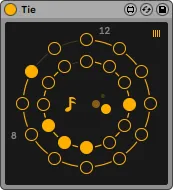
Tie is our updated take on a max for live sequencer, designed for experimental techno music producers.
In Tie, you set the barriers for your sequence, like, lowest note, highest note, lowest velocity, highest velocity.
After that, you hit the full random button and tie creates you a note sequence and a velocity sequence. Then, you can alter the sequences with random note lengths, cycling, realtime shifting or turning steps on and off.
http://www.encoderaudio.com/control.html
https://www.youtube.com/watch?v=h1MjWp3sqMU&feature=emb_logo
Version History :
1.o1 - basic bug fixes, alignment fixes, now the control panel is dead center, live.banks module added, support for Tempo automation added
1.o2 - just a minor UI update (sequence shift left or right buttons fixed!)
1.o3 - random sequence button is now MIDI mappable via Live
2.oo - full re-design, better interface, better workflow
2.o1 - minor tweaks
2.o2 - internal clock fix
2.o3 - minor bug-fixes
2.o4 - Apple silicon check
2.o5 - dynamic UI
2.o6 - minor UI update
2.o7 - Live 12 compatibility check and UI fix
2.o8 - inactive mode UI update
Comments (2)