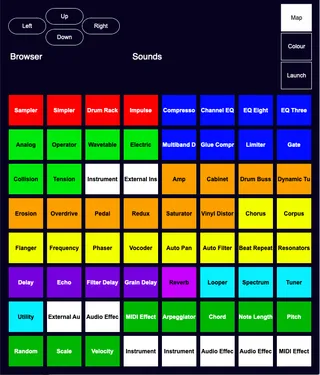
Browser Mapper
***DEPRECATED*** This device has been deprecated and ...
- Type
- MIDI Effect
- Author
- flowstate
- Version
- 1.4.1
- License
- Commercial
- Live version
- 10.1
- Max version
- 8.0.4
- Downloads
- 0
- Updated
- 2024-01-15
Browser Mapper is a MIDI Effect for Ableton Live by flowstate, distributed as a commercial (paid) device. It targets Live 10.1 and Max 8.0.4. First published 2019-12-17, last updated 2024-01-15. 47 user comments below.
New to Max for Live? Read what MIDI Effects do, what the Commercial license means, how to install a device.
Description
***DEPRECATED***
This device has been deprecated and will now be available for free while work can continue on other devices and projects
***DEPRECATED***
MIDI/Key map anything in Live's Browser.
Use an iPad/Tablet as a quick launch for your favourite plugins and effects.
Max for live device and MIDI Remote Script combination.
64 mappable buttons that come already setup with all of Live Suite's Instruments, Audio Effects & MIDI Effects, with 5 empty spaces. These can all be overwritten so adding 3rd-Party plugins, samples etc is possible.
Easily map frequently used devices for quick launch.
Comes with installation and usage instructions as well as an Example set.
Release Notes:
v1.1 -
Added Automap functionality for MIDI controllers (works best with Launchpad/Push). Removes the need for manually mapping. Details contained in the instructions file.
V1.2 -
Added Mira Support for tablet
Added customizable colours for font and background
Added support for User Folders
V1.3 -
Added support for Live's Packs
Added support for aupreset files
V1.4-
Updated GUI (compatible with themes)
V1.4.1 -
Bugfix (various)
Added separate Mira/Non Mira devices for use with or without iPad.
Added Load button
Comments (47)
I bought this and am trying to map a .aupreset file.
However, nothing happens when I click the square.
Any suggestions? It works otherwise.
Thank you
Ben
"As they don't exist as own preset files on the hard disk, they can neither be displayed in nor loaded from Live's Browser."
https://help.ableton.com/hc/en-us/articles/209775145-AU-preset-handling
Appologies for the inconvenience.
The workaround for this is to save an instrument rack with the plugin and preset you want into your user library, this can then be mapped to a button for quick launching.
Please feel free to email me regarding this as I will still be looking into it further.
Thanks
Josh
I am aiming to include this functionality into BrowserMapper V1.3. Drag and drop for files ONLY, not devices.
It would be possible to do this if the device was saved in a rack, and therfor had a .adg extension.
Hope it is possible to add .als files to the Ableton set to quickly recall track presets (groups with instruments and audio tracks) and browse Collections folders.
Love the plugin, awesome job!
Could you also make an Audio Device of it? As I like to load my audio effect plugins on an Audio track as well !
Tried to 'convert' it from a m4l MIDI device to an m4l audio device, but that didn't work so smoothly. (I tried to convert it myself inside m4l, but gave me an error when loading the plugin again in an audio track, and opened up all the 64 plugins). I think, you probably know why so that's why I'm asking:)
Thanks in advance!!
Thanks for the suggestion.
It was my intention to create an iPad Lemur patch for Browser Mapper so that you can view the GUI on an iPad that way.
I agree that having it on an iPad will make it much more useful as you can see the colours and text of the buttons.
There are a few updates planned for this in the next few months so please look out for those.
I will look into adding Mira support also
Thanks :)
from beta update notes:
Updated the bundled Max build to version 8.1.3 RC.
For a complete Max 8.1.2 changelog, visit: http://cycling74.s3.amazonaws.com/support/version_8_1_2.html
For a complete Max 8.1.3 changelog, visit: http://cycling74.s3.amazonaws.com/support/version_8_1_3.html
I think everything has to be put into a new folder because they will keep wiping the main one with updates :
It is now possible to create a "Remote Scripts" folder in the User Library, where user/third-party scripts can be added for use with MIDI controllers. Added scripts will appear in the Link/MIDI Preferences tab.
I will look into these new changes to the remote scripts and how they affect the functionality of Browser Mapper and future devices :)
Restarting ableton, will cause browser mapper to not work again.
Renaming the folder to a previous name and the selecting the script in preferences seems to work - so at least its not the name getting stored somewhere and filling up a db - its something with the script not being registered for Browser Mapper to find it correctly - even if its still selected in preferences. I guess its bug report time..
I'm having trouble recreating the issue your describing.
To clarify the script must be installed using the method and install location as described here:
https://help.ableton.com/hc/en-us/articles/209072009-Installing-Third-Party-Control-Surfaces
Not in the user remote scripts folder.
There should be no need to rename or move any scripts.
Please could you send your log.txt file to the support email provided and I will have a look at this further.
When downloading the latest Browser Mapper update please ensure you replace the remote script with the new one also as there have been some changes to it and the old ones will not work with version 1.2.
If you would like to email me on the support email provided I could have a look at your issue in more detail and maybe video call / screen sharing session with you to see if we can get to the bottom of it.
I have checked the latest version again on Windows and Mac Ableton Live 10.1.9 with no issues.
It is now possible to install the script in the new location in the User Library. This will be updated in the documentation shortly.
Device loads perfectly though compared to the 1.1 issue I had, mentioned above.
Other than that - would be cool if you could type/search for the device to assign if at all possible.
More sane feature requests - a nicer colorpicker or swatch would be cool - maybe another one can be embedded or assigned (i think jitter uses its own, gotta check again).
Suggestion -when opening the device Launch mode might be better as an initial value, so you don't accidentally assign something.
I doubt that you can write protect the .py files for mappings but that could be sweet too - or an export so you can quickly backup your mappings and colors without folder diving - although its not hard.
great job on 1.4 anyway - really handy
so script show Display1, script show Display2 and script hide Display1, script hide Display2
Thanks for your detailed report - I'll get on looking at those bugs right away,
I'm fairly sure the recent updates to remote script location installation work well now.
I will definitely take a look at your suggested features also - there are further planned updates for this device that should make it much more user friendly, the situation regarding setting up the mappings is definitely on the raddar - currently trying to find a better way of doing this.
I am mapping out the shortcuts to devices right now and thinking about what can possibly be an easy approach -
one thing is of course the user can organize devices they want to map via folders before assigning the shortcuts so its easier to click through and map in BrowserMapper.
I don't want to mess any old projects up so will just leave it as is and browser around finding the devices and assigning them.
I guess the Ableton Categories aren't available for BrowserMapper to see, that could be a nice solution perhaps. Kinda wish they added more categories though - maybe im hoarding stuff but I use quite a lot of devices and just generally like to switch it up a bit so i don't get ableton depression.
one thing i think might be possible is rearranging the button assignments - perhaps when in mapping mode you can swap around the assignments by clicking on the squares.
Anyway, most important it works great so far, everything else is just QOL.
There are planned updates to this device to make navigation and mapping much more streamlined.
I am currently working on Browser Mapper 2.0 and hope this will be much more streamlined and useful. If anyone has any suggestions or requests feel free to drop them here or send me an email on the email address provided.
Thanks
Josh
Love the browser mapper, really has sped up my workflow! I've noticed that it doesn't seem to work properly with the Live 11 update and I was wondering if there was any plans to make an update for it?
Thanks!
Yeah, there have been some big changes to the scripts in Live 11, I've had a few people reach out over email asking for it to be made to work in Live 11. I WILL get round to updating the device to work in 11 as well as some other already planned updates but it won't be until some time in April. I will send out an email once the work has been done. Appologies for any inconvenience.
Do I understand this in the right manner?
Can you use it without a tablet?
So midi mapping on push 1
As described.
Added Automap functionality for MIDI controllers (works best with Launchpad / Push).
And does it now have support for Live 11?
thanks
The automap functionality for Push and Launchpad was removed as this was giving errors with the ordinary functioning of these controllers, but you can still manually map to any CC or Note as normal.
Live 11 support is underway and will be coming soon, along with an update to the device in general.
Hope this helps :)
Is it possible to save items to collections on the push 2 with this device?
Unfortunately not, Browser Mapper is only for navigating and loading items from the Browser.
Live 11 support has now been added.
Further updates are still underway.
Thank you for your patience and stay tuned :)
just bought this and I have a question.
it doesn't change Push 2 pads color according to what I see in the device window, does it? If it's not, what's the purpsoe of coloring then, or maybe am I missing something?
What I really miss is the ablity to load devices to arbitrary tracks without having to change their MIDI input. I have configured and MIDI mapped the browser mapper device in the Push 2 user mode and saved with my main tempate project, so I have a dedicated MIDI track that holds a Browser Mapper instsnce. But in order to load a device on to another track I first have to change MIDI input, then press a pad that corresponds to to a needed device, and then change MIDI input back to normal. This sort of kills the advantage of Browser Mapper.
In general, I really like the idea of having instant access to 64 devices, it would be a game changer for me as I hate push standard browsing fucntionality. Can you just please update the device so that it loads plugins to a currently selected/armed track without that MIDI input thing? Such an update would also solve the audio tracks problem as one cannot use this with them for now.
Maybe there is a workaround or my workflow is somehow inefficient ? Just wondering why this hasn't been discussed in the comments before.
Having read the manual, this part in particular:
"For pre-mapped controller use, connect a controller (Launchpad or Push work best), set the MIDI input of the MIDI track from that device and arm the track"
I came to conclusion that setting MIDI input is a mandatoy step. As it turns out it isn't and everything actually works as I requested above, so devices are loaded to a selected track, including audio tracks.