Binaural Sine Tone Generator
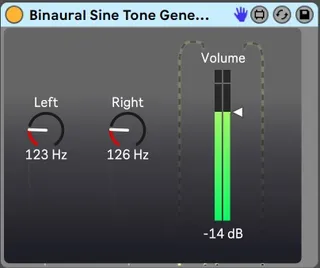
A simple sinusoidal tone generator where you can control the...
- Type
- Instrument
- Author
- henrifalk
- Version
- 1.0
- License
- None
- Live version
- 10.1.7
- Max version
- 8.1.0
- Downloads
- 1,179
- Updated
- 2020-02-03
Binaural Sine Tone Generator is an Instrument for Ableton Live by henrifalk, distributed as freeware, with no license specified by the author. It targets Live 10.1.7 and Max 8.1.0. On maxforlive.com it has 1,179 downloads. Published 2020-02-03. 1 user comment below.
New to Max for Live? Read what Instruments do, how device licenses work, how to install a device.
Description
A simple sinusoidal tone generator where you can control the frequency going to the left and to the right stereo channel, respectively. The frequency difference between left and right will create a binaural beat. For full effect, headphones are required, however, depending on speaker placement, a beat will typically be heard using speakers as well. Needless to say, for entering an exact frequency (if turning the dial with the mouse is not precise enough), just click on the number and type the desired frequency on your keyboard, hit enter.
To create a monaural beat, i.e. the same amplitude modulated beat your brain creates when listening to binaural tones, coming out from each speaker; simply place the Utility device after this instrument and click 'mono'.
To create isochronic tones, i.e. a beat created by turning a signal on and off, use the Gate device in Ableton after this instrument, and after the Utility device with 'mono' activated.
Another tip to play with amplitude modulation, phasing and modulation in general is the LFO device in M4L.
Enjoy!
Comments (1)