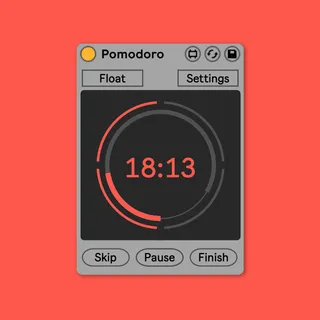
Pomodoro
When you break it down, music production is an exercise in b...
- Type
- MIDI Effect
- Author
- pATCHES
- Version
- 1.0
- License
- None
- Live version
- 10.1.7
- Max version
- 8.1.1
- Downloads
- 0
- Updated
- 2020-02-07
Pomodoro is a MIDI Effect for Ableton Live by pATCHES, distributed as freeware, with no license specified by the author. It targets Live 10.1.7 and Max 8.1.1. Published 2020-02-07. 8 user comments below.
New to Max for Live? Read what MIDI Effects do, how device licenses work, how to install a device.
Description
When you break it down, music production is an exercise in both creativity and productivity. Without a mindful approach to the latter, it’s easy to end up lost in meandering exploration. I’ve found it helpful to “outsource” the structure of my work to external, objective guidance and one of my favorites systems for this is the Pomodoro timer. This device puts the productivity clock directly into the Live set to assist with tracking and committing to the goals you set for your session.
Keep Focus
The idea behind this device is straightforward — start the timer as a commitment to a short sprint. “Whatever happens, I can and will make forward progress for 25 minutes.” That’s a specific, measurable, achievable goal, whether it’s to limit the time you’ll spend seeking a preset, programming a beat, or improvising different melodies.
At the end of the work period, take a break, no matter what you’re working on or where you’re at. It’s very easy to lose yourself in a marathon session, throwing yourself at the same problem over and over again. Take that moment to step away. Go on a walk, meditate, catch up on email, read an article. A short respite can be just what’s needed to return to the problem with clarity, fresh eyes and ears and ideas.
Are there any advantages to having the Pomodoro clock in your Live set versus any of the other great existing productivity apps? Not entirely, this is mostly a fun, experimental, and low-rent solution to getting started with Pomodoro’ing.
You’ll find a few minor-yet-useful features take advantage of Ableton integration, however. At the end of a work cycle, for instance, the transport will stop (so long as you aren’t recording) to encourage you to really, truly take a break for a bit. The system doesn’t work if you use the break to check “one more thing” or “just finish up”, so a little reminder that the work cycle is ended can be a great help.
Comments (8)
Thanks
Thank you @pATCHES!