- Type
- MIDI Effect
- Author
- kirkwoodwest
- Version
- 1.1
- License
- None
- Live version
- 10.1.43
- Max version
- 8.1.11
- Downloads
- 320
- Updated
- 2024-02-08
Diva Octaver is a MIDI Effect for Ableton Live by kirkwoodwest, distributed as freeware, with no license specified by the author. It targets Live 10.1.43 and Max 8.1.11. On maxforlive.com it has 320 downloads. First published 2020-02-08, last updated 2024-02-08.
New to Max for Live? Read what MIDI Effects do, how device licenses work, how to install a device.
Description
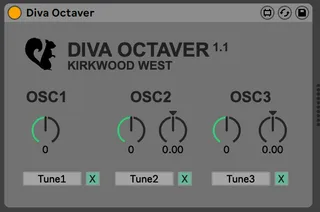
This is a simple tool used to have octave and fine tuning controls as separate knobs for midi mapping.
To use: Open Instance of DIVA. Place max for live device on same channel before DIVA. Expose The tuning parameters to Ableton (There are 3 of them, use the configure button). In the DIVA Octaver panel press map and select the appropriate tuning parameter in diva. Do this for each oscillator.
Now you should have midi-mappable/automatable parameters for DIVA.
Rant to VST Manufacturers: Don't stack parameter control into one parameter like this. There are plenty other ways this could have been implemented. Also, make your VST 100% automatable and controllable via automation, CC Midi mapping is not bi-directional.
Hit me up if there are any issues with the device via kirkwoodwest.com
Credits:
Steolepanda for the mapping controls from 8 KONTROL. Thank You for keeping it open source. https://maxforlive.com/profile/user/Steolepanda
Benjamin Hidas for reporting a breaking issue with 1.0 and testing. You are the man! - https://www.instagram.com/benjamin.hidas/