color colorer - color regions instantly
T: Damn I wish I could color regions instantly by clicking a...
- Type
- MIDI Effect
- Author
- Jwalrus
- Version
- 1.0
- License
- None
- Live version
- 10.1
- Max version
- 8.0.4
- Downloads
- 269
- Updated
- 2020-02-04
color colorer - color regions instantly is a MIDI Effect for Ableton Live by Jwalrus, distributed as freeware, with no license specified by the author. It targets Live 10.1 and Max 8.0.4. On maxforlive.com it has 269 downloads. Published 2020-02-04. 4 user comments below.
New to Max for Live? Read what MIDI Effects do, how device licenses work, how to install a device.
Description
T: Damn I wish I could color regions instantly by clicking a key on my computer keyboard here rather than laboriously right clicking and then selecting from a whole range of super icky default ableton colors.
R: I've got just the thing.
T: You mean you spent hours making a max patch that does this?
R: Yep.
T: What a waste of time.
INSTRUCTIONS:
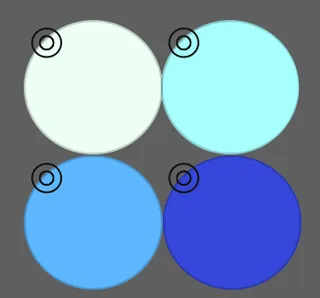
1. Assign each of these color swaths to any key on your computer keyboard (using command+K)
2. Select the color you want each key to correspond to, using the circle in the upper lefthand corner of each swath.
3. To color a region, just select it and press any of the previously assigned computer keys.
I wanted it for comping, to quickly label parts that were good. Maybe you do too. We can be friends.
YOU SHOULD KNOW:
It can only color one region at a time.
It will color the whole region, so if you want a segment of the region colored, you have to cut it first (command+e), then color.
Make sure you assign your key to the color swath, not the upper-left color selecting ring button guy. If a color wheel comes up when you're trying to color a region, that's why.
I PERSONALLY recommend putting it on your default session's master track. (It doesn't matter where you put it by the way.) And have keys then pre-assigned to colors. But you don't have to take my advice now do you, no sir.
㘟
Comments (4)
https://i.imgur.com/8HmGDAO.jpg
Would be great to assign the 16 pads of the LaunchKey Mini to 16 colors.
Great little device tho. Thanks! :)
This will save me a ton of time when comping.
Thanks for making this!