- Type
- MIDI Effect
- Author
- CharlyBeck
- Version
- 0.3.3
- License
- AttributionNonCommercialShareAlike
- Live version
- 10.0.1
- Max version
- 8.0.4
- Downloads
- 1,413
- Updated
- 2020-03-23
CbHitMachine is a MIDI Effect for Ableton Live by CharlyBeck, distributed as Creative Commons Attribution-NonCommercial-ShareAlike. It targets Live 10.0.1 and Max 8.0.4. On maxforlive.com it has 1,413 downloads. First published 2020-02-11, last updated 2020-03-23. 3 user comments below.
New to Max for Live? Read what MIDI Effects do, what the AttributionNonCommercialShareAlike license means, how to install a device.
Description
Chord generator / Chord progression generator
You always wanted to play the melodies of favorite pop songs or just bring some more melodic flavor to your experimental tracks but you don't know too much about music theory? No problem! This device let's you build earworms by just clicking 2 Buttons (including the Playbutton ;) )
Choose one of the currently 16 patterns or choose some nearby buttons in the circle of fifth to get harmonic progressions.
This ableton live set template with the CbHitMachine device allows you to:
- Play "normal" chords arranged in circle of fifth
- Play "special" chords (Maj7,7/9, Aug, Dem etc.) arranged in circles of fith
- Play all inversions of all chords arranged in circle of fifths
- Select the key and major/minor
- Play chord stages I-VII for the selected key
- Play a predefined set of popular chord progressions.
- Displays the name of the chord.
It's under development. I testet it with c key mainly. If you find some wrong generated chords please let me know.
Tip: Deactivate ableton setting "select (track) on start (clip)" This allows you to select the track with the device and see the played chords yet after launching a clip on another track.
Version history:
v0.1: Initial
v0.2: Replaced Piano with analog synth to avoid missing samples.
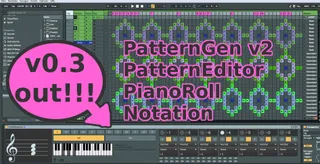
v0.3: Progressiongenerator V2, ProgressionEditor. Display piano roll and notation. Known issues: Extended chords wrong calculation. (see pattern 9 for example)
v0.3.1: Some bugfixes. (MinorScale, Extendended chords, Updating sequence etc.)
v0.3.2: Some more Bugfixes.
v0.3.3: Bugfix on inversions.
Comments (3)