- Type
- MIDI Effect
- Author
- Jwalrus
- Version
- 1.0
- License
- None
- Live version
- 10.1
- Max version
- 8.0.4
- Downloads
- 932
- Updated
- 2020-02-01
note2chord is a MIDI Effect for Ableton Live by Jwalrus, distributed as freeware, with no license specified by the author. It targets Live 10.1 and Max 8.0.4. On maxforlive.com it has 932 downloads. First published 2020-01-31, last updated 2020-02-01. 2 user comments below.
New to Max for Live? Read what MIDI Effects do, how device licenses work, how to install a device.
Description
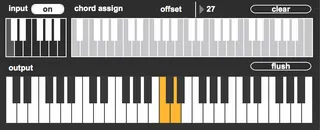
assign custom chords to individual notes on an octave keyboard
R: wow how'd you get so good at playing chords
M: it's a secret
R: jerk
M: yep
R: if you were a real friend you'd tell me
M: I am a real friend
R: then tell me
M: no
R: jerk
M: fine
R: yes
M: I'm using that M4L device that turns individual notes in an octave span of a keyboard into ANY ASSIGNABLE CHORD I WANT.
R: that's it?
M: yea
R: oh that's kinda underwhelming.
M: yeah but it works. you can make some sick shit.
R: fine I'll download it.
INSTRUCTIONS
1. click any note in the INPUT keyboard
2. click any series of notes (aka a chord) in the CHORD ASSIGN keyboard
3. turn INPUT on (if you haven't already), that first note now plays that wonderful chord you assigned to it. (You have to play it in the right octave though. I think 2 octaves below middle C)
clear - forget the chord assigned to that note (right now if you click a wrong note while composing a chord, you have to just clear the chord and start again)
offset - scrolls the assign keyboard up or down
it only sends note on information in this version, so you probably want to use it in tandem with the Note Length midi plugin
吉
Comments (2)