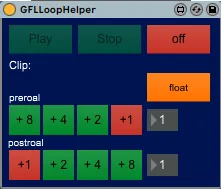
GFLLoopHelper
Start playing a preroal-time before the loop-end-time, jump ...
- Type
- Audio Effect
- Author
- gfl
- Version
- 1.0
- License
- None
- Live version
- 10.0.1
- Max version
- 7.3.5
- Downloads
- 162
- Updated
- No Updates
GFLLoopHelper is an Audio Effect for Ableton Live by gfl, distributed as freeware, with no license specified by the author. It targets Live 10.0.1 and Max 7.3.5. On maxforlive.com it has 162 downloads. Published 2020-03-15.
New to Max for Live? Read what Audio Effects do, how device licenses work, how to install a device.
Description
Start playing a preroal-time before the loop-end-time, jump to loop-begin-time, play for a postroal-time, jump to a preroal-time before the loop-end-time, play and so on.
Move it to the master-track, hit float and select the clip, whose loop you want to edit.
Preroal and postroal be can set by the [+8], [+4], … Buttons or by the numberbox. The [+1] can be switch off.
Hint: sometimes, e.g. if you move the loop-end-marker before the preroal-time, the loophelper can`t jump, so hit [play] and it works again.